


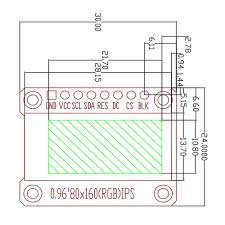
Interface definition:
- 1. GND (Power ground)
- 2. VCC (Power +3.3)
- 3. SCL (SPI clock line)
- 4. SDA (SPI data line)
- 5. RES (LCD reset, LCD needs to be reset once after power-on)
- 6. DC (SPI data/command selection pin)
- 7. BLK (LCD backlight control, default can be left floating, low level to turn off the backlight)
Feature:
- Size: 0.96 Inch
- Material: New IPS color screen, the color is more vivid than ordinary TFT LCD screen
- Resolution: 80*160 display, direction can adjust horizontal screen vertical screen
- Control chip: ST7735
- Display area: 10.8 x 21.696mm
- Physical size: 24 x 30mm
- Interface type: SPI interface
- Number of pins: 7
- Display color: Full Color
- Working temperature: -20~70°C
- Working voltage: 3.3V
Specifications
Resources
Tutorial
What interface and voltage does the display require?
It uses an SPI interface with 7 pins and operates at 3.3 V. The pins are GND, VCC 3.3V, SCL, SDA, RES, DC and BLK, and the BLK pin can be left floating with a low level turning off the backlight.
How do I wire and power this display?
Connect GND to system ground and VCC to 3.3 V. Connect SCL to the SPI clock, SDA to the SPI data, RES to the reset line, DC to data command, and BLK to the backlight control line. BLK can be left floating and driving it low turns off the backlight.
What is the resolution and can the orientation be changed?
The module has a 0.96 inch IPS display with a resolution of 80 by 160 and the direction can be adjusted for horizontal or vertical orientation.
What are the operating conditions and electrical requirements?
The display operates at 3.3 V and has a working temperature range of minus 20 to plus 70 degrees Celsius. It supports full color output via the ST7735 controller.
What documentation and support are available?
Resources include the datasheet library sample code and tutorials for integration and development.
Description
Interface definition:
- 1. GND (Power ground)
- 2. VCC (Power +3.3)
- 3. SCL (SPI clock line)
- 4. SDA (SPI data line)
- 5. RES (LCD reset, LCD needs to be reset once after power-on)
- 6. DC (SPI data/command selection pin)
- 7. BLK (LCD backlight control, default can be left floating, low level to turn off the backlight)
Feature:
- Size: 0.96 Inch
- Material: New IPS color screen, the color is more vivid than ordinary TFT LCD screen
- Resolution: 80*160 display, direction can adjust horizontal screen vertical screen
- Control chip: ST7735
- Display area: 10.8 x 21.696mm
- Physical size: 24 x 30mm
- Interface type: SPI interface
- Number of pins: 7
- Display color: Full Color
- Working temperature: -20~70°C
- Working voltage: 3.3V
Specifications
Resources
Tutorial
FAQ
What interface and voltage does the display require?
It uses an SPI interface with 7 pins and operates at 3.3 V. The pins are GND, VCC 3.3V, SCL, SDA, RES, DC and BLK, and the BLK pin can be left floating with a low level turning off the backlight.
How do I wire and power this display?
Connect GND to system ground and VCC to 3.3 V. Connect SCL to the SPI clock, SDA to the SPI data, RES to the reset line, DC to data command, and BLK to the backlight control line. BLK can be left floating and driving it low turns off the backlight.
What is the resolution and can the orientation be changed?
The module has a 0.96 inch IPS display with a resolution of 80 by 160 and the direction can be adjusted for horizontal or vertical orientation.
What are the operating conditions and electrical requirements?
The display operates at 3.3 V and has a working temperature range of minus 20 to plus 70 degrees Celsius. It supports full color output via the ST7735 controller.
What documentation and support are available?
Resources include the datasheet library sample code and tutorials for integration and development.
Related products
Related products


