Best seller

Waveshare

7inch Wide Color Gamut Capacitive Touch Display- 1280×800 with HDMI Interface

SKU: WVSH0116

₹ 10,099.99

Out of stock

📦 Min order 1
Chat with us on WhatsApp We reply quickly! Contact Us
This is a pre-order item. We'll ship it as soon as it's back in stock.
7inch Wide Color Gamut Capacitive Touch Display- 1280×800 with HDMI Interface₹ 10,099.99
Ask AI about this product

7″ Wide Color Gamut Touch Display

HD Resolution | Multi-Point Touch | Full Color


Size7" Resolution1280×800 Display InterfaceHDMI Display PanelIPS Viewing Angle178°
Touch TypeCapacitive Touch Points10-Points Touch PortUSB C Touch PanelToughened Glass Touch Panel TechOptical Bonding
OSD MenuBrightness/Contrast Audio Output3.5mm Jack BrightnessSupports DDC/CI Control Brightness350cd/m2 SoundHi-Fi Speaker


Device & System Support


Raspberry Pi

Supports Raspberry Pi OS, 10-point touch, driver free
Supports Ubuntu / Kali / WIN10 IoT, single point touch, driver free
Supports Retropie, driver free

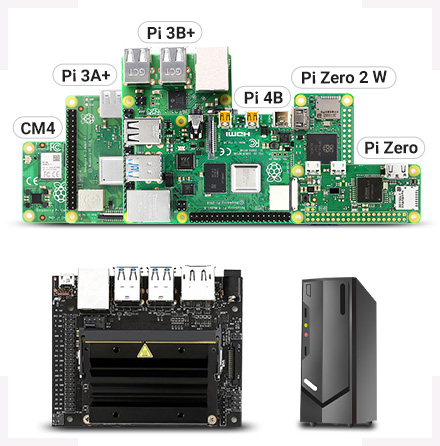
Supports all versions of Raspberry Pi

Jetson Nano

Supports Ubuntu, single point touch, driver free

PC

Supports Windows 11 / 10 / 8.1 / 8 / 7, 10-point touch, driver free


Connection Examples

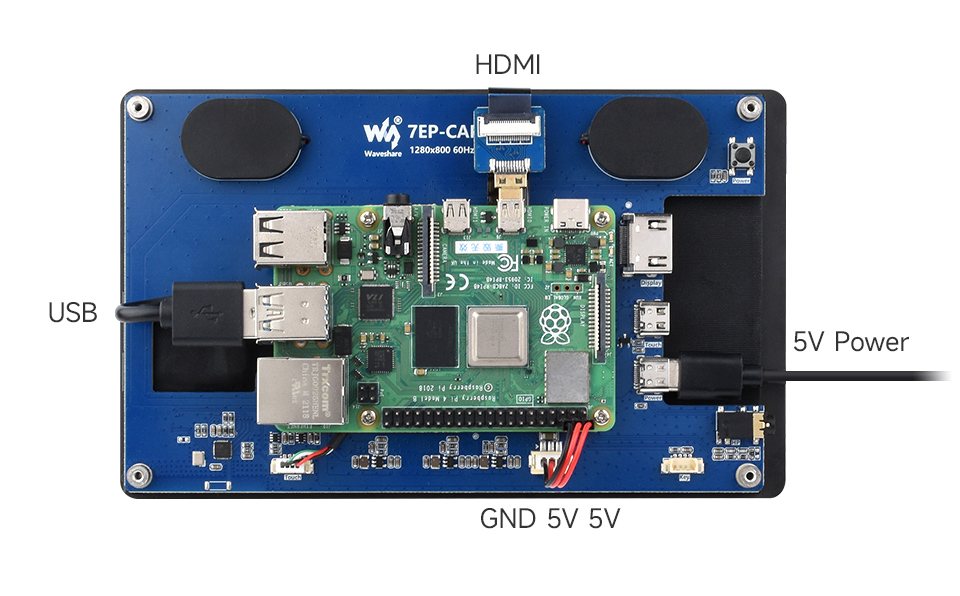
Working With Raspberry Pi 5 / 4B

7inch Capacitive Touch Display, working with Raspberry Pi 5
 

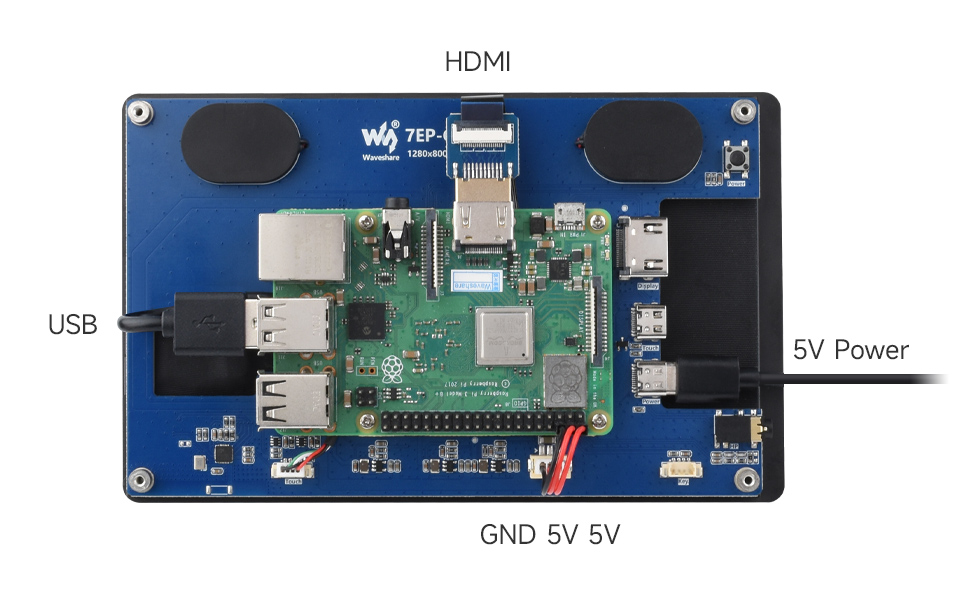
Working With Raspberry Pi 3B+

7inch Capacitive Touch Display, working with Raspberry Pi 3B+
 

Working With Jetson Series Board
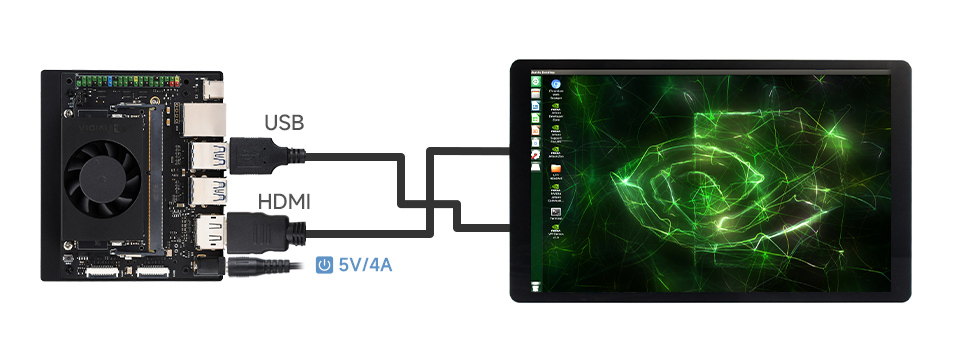
7inch Capacitive Touch Display, working with Jetson Series Board
 

Working With PC
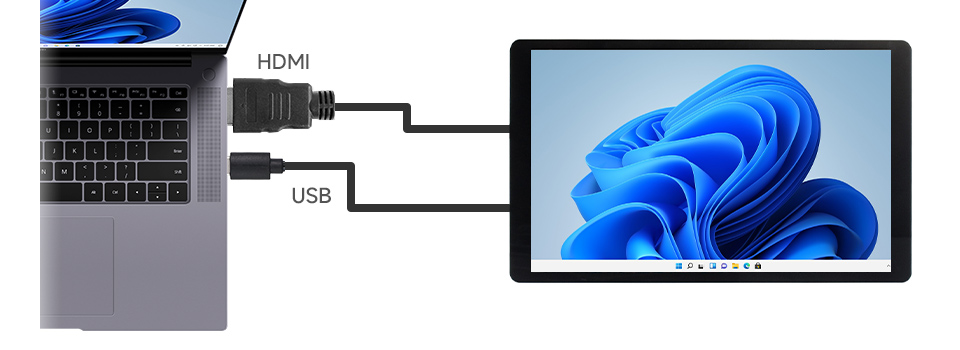
7inch Capacitive Touch Display, working with PC

* for reference only, the above controller boards or hosts are NOT included
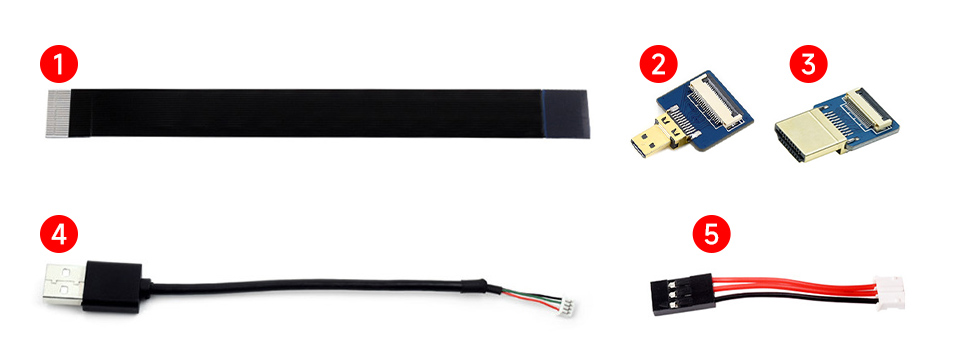
 

How To Install

the accessories for installing 7inch Capacitive Touch Display with Raspberry Pi 5

Prepare the accessories as shown above, here we take Raspberry Pi 5 as an example
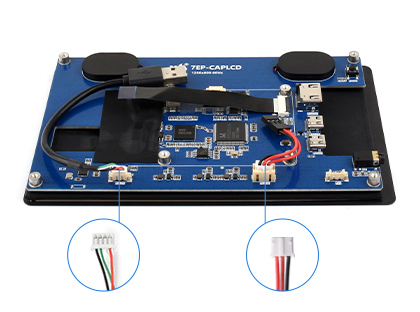

Install 7inch Capacitive Touch Display with Raspberry Pi 5, step 1

Step 1:
Connect the cable ①, ④, and ⑤ to the corresponding positions as shown in the picture above.
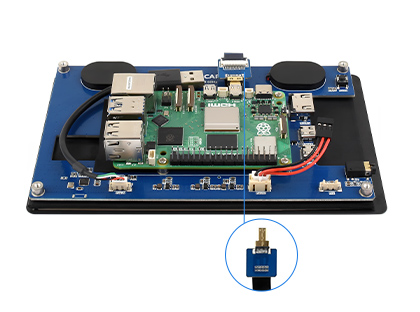
Install 7inch Capacitive Touch Display with Raspberry Pi 5, step 2

Step 2:
Install the Raspberry Pi 5 on the PCB board of the LCD, connect the HDMI adapter to the cable ① (select HDMI adapter ② or ③ according to your Raspberry Pi model) and then connect it to the Raspberry Pi Micro HDMI port.
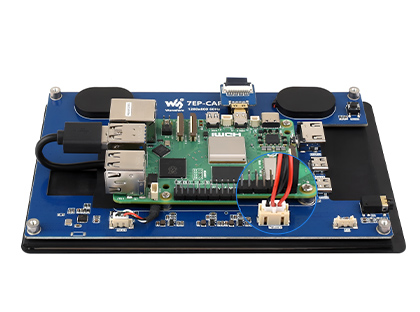
Install 7inch Capacitive Touch Display with Raspberry Pi 5, step 3

Step 3:
Connect the cable ④ to the USB port of the Pi and connect the cable ⑤ to the GPIO 5V and GND pins as shown above.
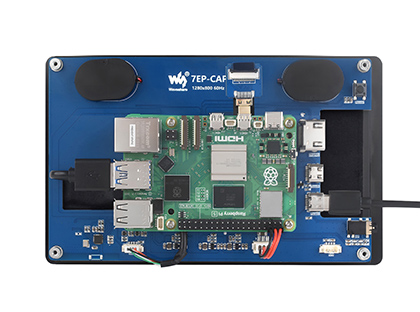
Install 7inch Capacitive Touch Display with Raspberry Pi 5, step 4

Step 4:
Complete the assembly as shown in the picture and ensure all connections are correct, then connect to a 5V power supply and power on.

* for reference only, the Raspberry Pi 5 is NOT included


Technology Upgrade, Better Image Quality

1280 × 800 Resolution, Provides Clear Image And Vivid Color Display Effect
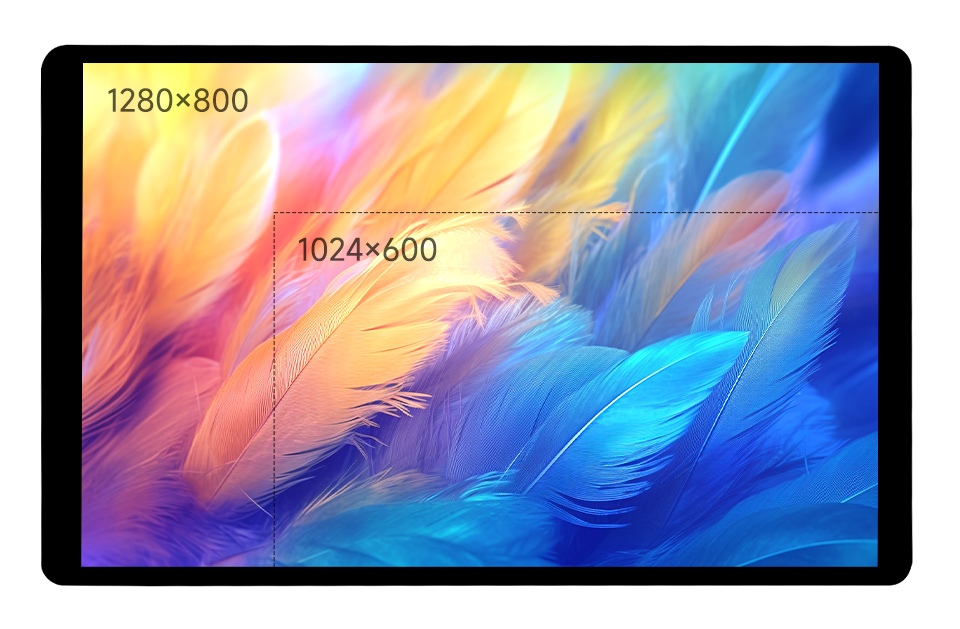
7inch Capacitive Touch Display, better image quality


IPS Display Panel

Excellent Display Performance With 178° Wide Viewing Angle
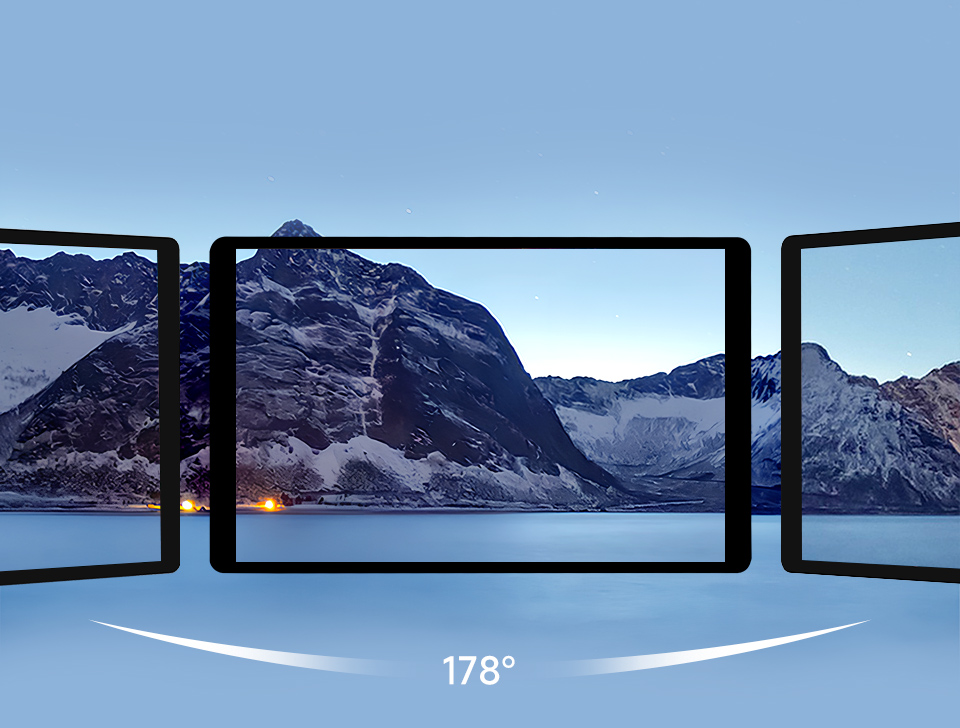
7inch Capacitive Touch Display, wide viewing angle IPS display panel


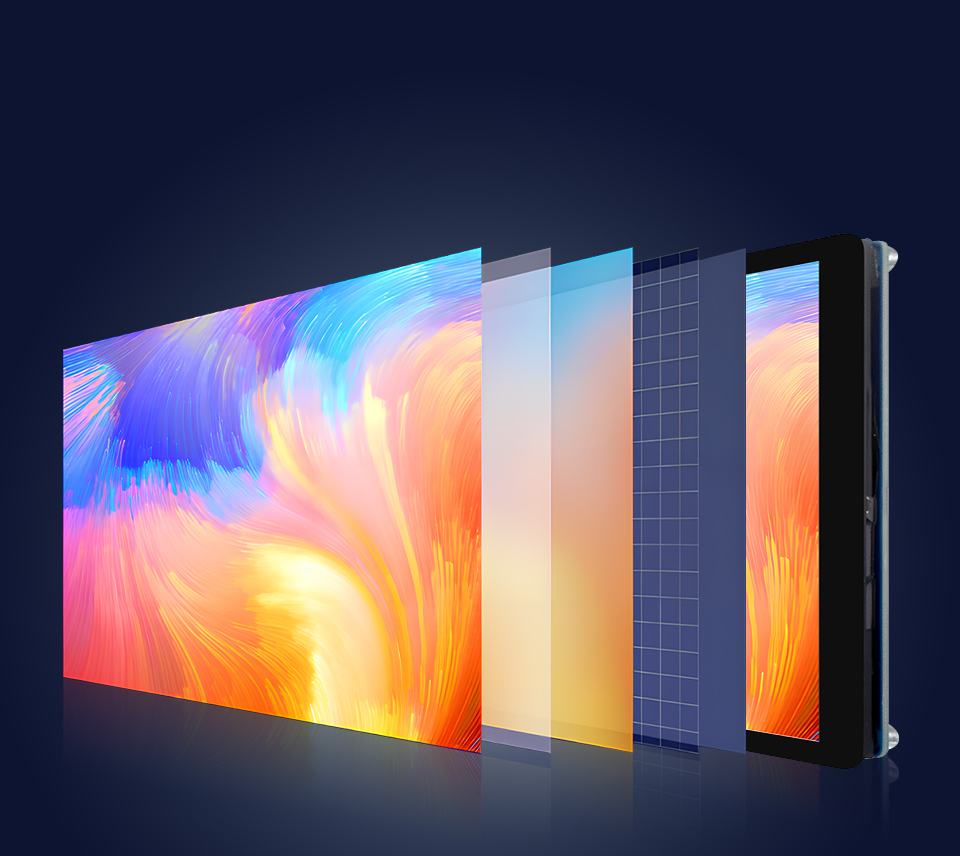
Wide Color Gamut LED Technology

Wider Color Gamut, More Pure Chroma

Color Gamut Of This Display Is Up To NTSC 68%, Chroma Increases 58.3%, Makes The Color More Pure, More Vivid

7inch Capacitive Touch Display, wide color gamut LED technology


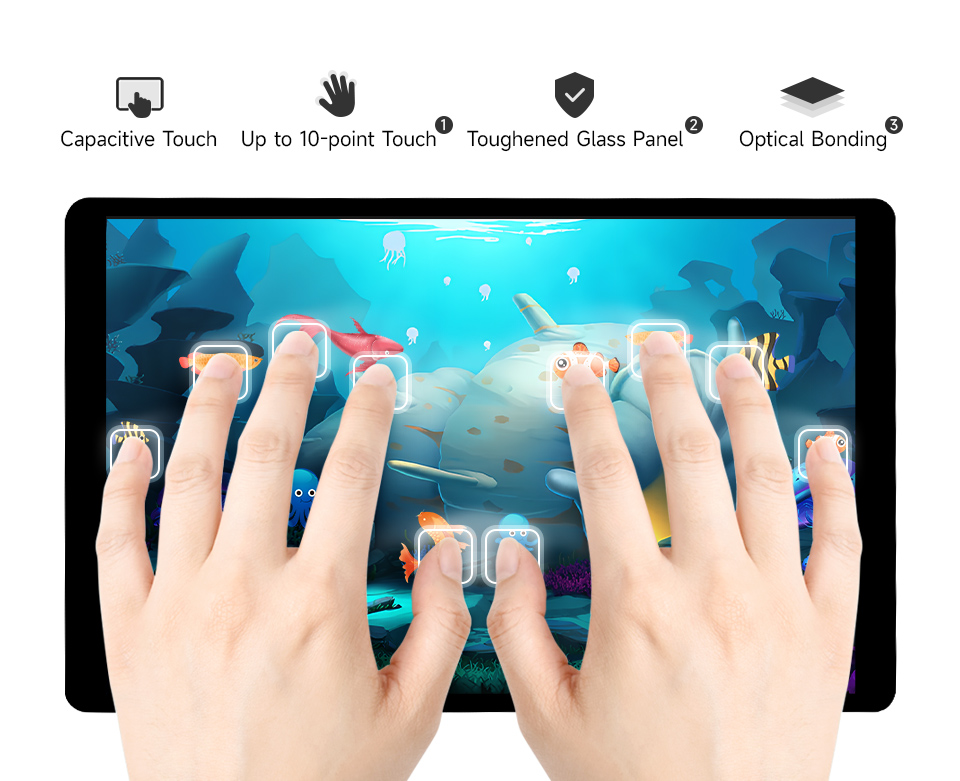
Capacitive 10-Point Touch

7inch Capacitive Touch Display, 10-point capacitive touch
  1. up to 10-point touch, depending on the operating system
  2. up to 6H hardness toughened glass panel
  3. Optical Bonding, provides clear image, dustproof


Supports DDC/CI Brightness Adjustment


Dual-Track Speaker

Ferrite Hi-Fi Speaker, Stereo Sound Effect, Wider Sound Range, Better Sound Quality
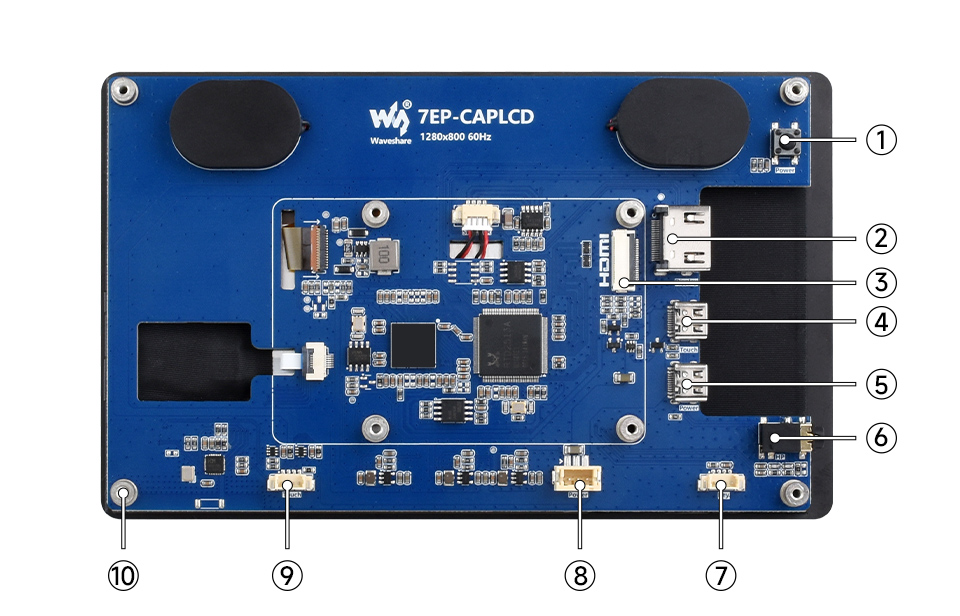


Interface Introduction


7inch Capacitive Touch Display, interface introduction
  1. Backlight ON/OFF
  2. HDMI Standard Interface
  3. HDMI FFC Connector
  4. Type-C Touch Port
  5. Type-C Power Supply Port
  1. 3.5mm Audio Jack
  2. Button Board Haeder
  3. 3PIN PH2.0 Power Supply Header
  4. 4PIN PH1.25 Touch Header
  5. M2.5 Mounting Standoff


Product Show

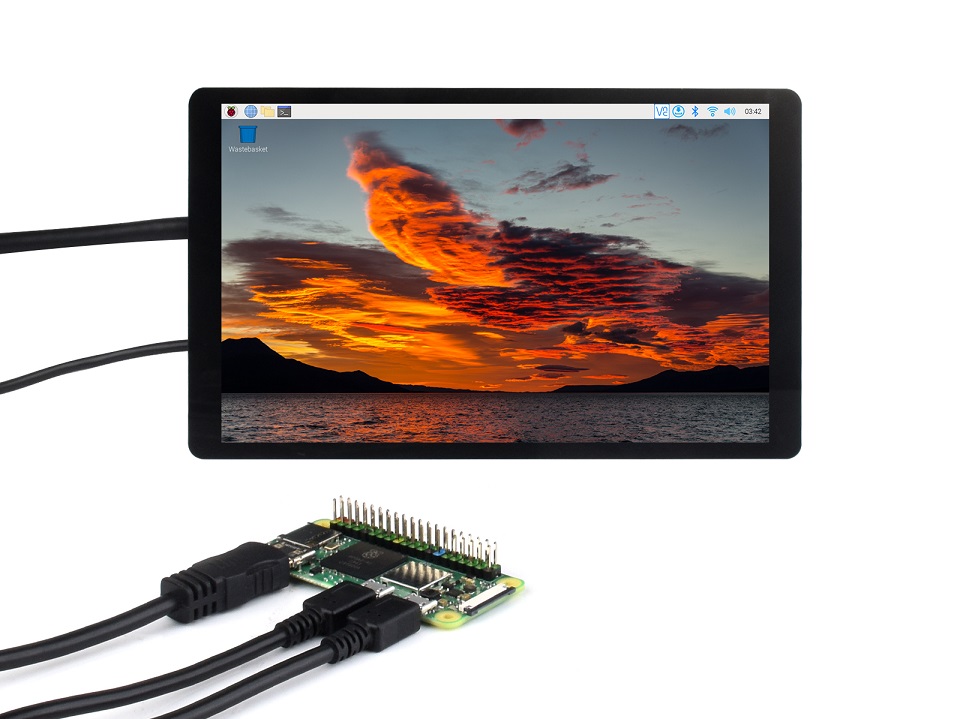
7inch Capacitive Touch Display, product show

* for reference only, the Raspberry Pi is NOT included


Dimensions

7inch Capacitive Touch Display, outline dimensions


Resources

Wiki: www.waveshare.com/wiki/7EP-CAPLCD


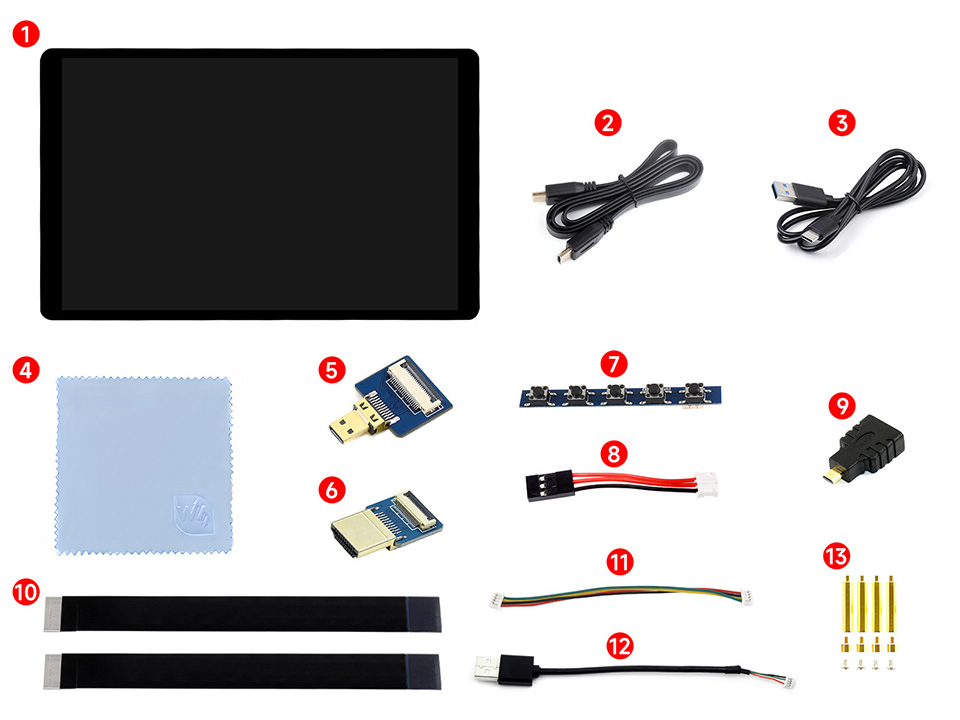
Package Contains

Weight: 0.37 kg

  1. 7EP-CAPLCD ×1
  2. HDMI flat cable ~1m ×1
  3. USB Type-A to Type-C cable ~1m ×1
  4. Cleaning cloth x1
  5. Micro HDMI Adapter ×1
  6. HDMI Adapter ×1
  7. Button board ×1
  8. 3PIN cable ×1
  9. HDMI to Micro HDMI Adapter ×1
  10. FFC 20PIN cable 2pcs ×1
  11. 1.27H 4PIN cable ×1
  12. PH1.25 4PIN to Type-A cable ×1
  13. Screws pack x1
7EP-CAPLCD


Is this display compatible with Raspberry Pi, Jetson Nano and Windows PCs?
Yes. It supports Raspberry Pi OS with 10-point touch driver free, Jetson Nano with Ubuntu and single point touch driver free, and Windows PCs with 10-point touch driver free.
What connectors and power are required to install the display?
Video output uses HDMI, touch data uses a USB C port, and a 5V power supply is required. The package includes cables and adapters for HDMI, USB C, and power connections.
What are the key display specifications and capabilities?
The panel is 7 inches with 1280 by 800 resolution, IPS technology with 178 degree viewing angle, NTSC 68 percent color gamut, 350 cd per square meter brightness, and supports up to 10 point multi touch.
What is included in the package?
The package contains the 7EP CAP LCD unit, HDMI flat cable 1m, USB Type A to Type C cable 1m, cleaning cloth, Micro HDMI adapter, HDMI adapter, button board, 3PIN cable, HDMI to Micro HDMI adapter, FFC 20PIN cable 2 pieces, 1.27H 4PIN cable, PH1.25 4PIN to Type A cable, screws pack.
Is the touch experience driver dependent on the operating system?
Touch is driver free on the supported operating systems as listed, with 10 point touch on Raspberry Pi OS and Windows PCs, and single point touch on Jetson Nano and certain Ubuntu based setups.
Welcome to the discussion thread for 7inch Wide Color Gamut Capacitive Touch Display- 1280×800 with HDMI Interface
Feel free to ask questions, share tips or report issues.
Add Post

For more discussion Click Here

Fill out the form below and our team will get back to you with bulk pricing.

Description
Ask AI about this product

7″ Wide Color Gamut Touch Display

HD Resolution | Multi-Point Touch | Full Color


Size7" Resolution1280×800 Display InterfaceHDMI Display PanelIPS Viewing Angle178°
Touch TypeCapacitive Touch Points10-Points Touch PortUSB C Touch PanelToughened Glass Touch Panel TechOptical Bonding
OSD MenuBrightness/Contrast Audio Output3.5mm Jack BrightnessSupports DDC/CI Control Brightness350cd/m2 SoundHi-Fi Speaker


Device & System Support


Raspberry Pi

Supports Raspberry Pi OS, 10-point touch, driver free
Supports Ubuntu / Kali / WIN10 IoT, single point touch, driver free
Supports Retropie, driver free

Supports all versions of Raspberry Pi

Jetson Nano

Supports Ubuntu, single point touch, driver free

PC

Supports Windows 11 / 10 / 8.1 / 8 / 7, 10-point touch, driver free


Connection Examples

Working With Raspberry Pi 5 / 4B

7inch Capacitive Touch Display, working with Raspberry Pi 5
 

Working With Raspberry Pi 3B+

7inch Capacitive Touch Display, working with Raspberry Pi 3B+
 

Working With Jetson Series Board

7inch Capacitive Touch Display, working with Jetson Series Board
 

Working With PC

7inch Capacitive Touch Display, working with PC

* for reference only, the above controller boards or hosts are NOT included


How To Install

the accessories for installing 7inch Capacitive Touch Display with Raspberry Pi 5

Prepare the accessories as shown above, here we take Raspberry Pi 5 as an example


Install 7inch Capacitive Touch Display with Raspberry Pi 5, step 1

Step 1:
Connect the cable ①, ④, and ⑤ to the corresponding positions as shown in the picture above.

Install 7inch Capacitive Touch Display with Raspberry Pi 5, step 2

Step 2:
Install the Raspberry Pi 5 on the PCB board of the LCD, connect the HDMI adapter to the cable ① (select HDMI adapter ② or ③ according to your Raspberry Pi model) and then connect it to the Raspberry Pi Micro HDMI port.

Install 7inch Capacitive Touch Display with Raspberry Pi 5, step 3

Step 3:
Connect the cable ④ to the USB port of the Pi and connect the cable ⑤ to the GPIO 5V and GND pins as shown above.

Install 7inch Capacitive Touch Display with Raspberry Pi 5, step 4

Step 4:
Complete the assembly as shown in the picture and ensure all connections are correct, then connect to a 5V power supply and power on.

* for reference only, the Raspberry Pi 5 is NOT included


Technology Upgrade, Better Image Quality

1280 × 800 Resolution, Provides Clear Image And Vivid Color Display Effect

7inch Capacitive Touch Display, better image quality


IPS Display Panel

Excellent Display Performance With 178° Wide Viewing Angle

7inch Capacitive Touch Display, wide viewing angle IPS display panel


Wide Color Gamut LED Technology

Wider Color Gamut, More Pure Chroma

Color Gamut Of This Display Is Up To NTSC 68%, Chroma Increases 58.3%, Makes The Color More Pure, More Vivid

7inch Capacitive Touch Display, wide color gamut LED technology


Capacitive 10-Point Touch

7inch Capacitive Touch Display, 10-point capacitive touch
  1. up to 10-point touch, depending on the operating system
  2. up to 6H hardness toughened glass panel
  3. Optical Bonding, provides clear image, dustproof


Supports DDC/CI Brightness Adjustment


Dual-Track Speaker

Ferrite Hi-Fi Speaker, Stereo Sound Effect, Wider Sound Range, Better Sound Quality


Interface Introduction


7inch Capacitive Touch Display, interface introduction
  1. Backlight ON/OFF
  2. HDMI Standard Interface
  3. HDMI FFC Connector
  4. Type-C Touch Port
  5. Type-C Power Supply Port
  1. 3.5mm Audio Jack
  2. Button Board Haeder
  3. 3PIN PH2.0 Power Supply Header
  4. 4PIN PH1.25 Touch Header
  5. M2.5 Mounting Standoff


Product Show

7inch Capacitive Touch Display, product show

* for reference only, the Raspberry Pi is NOT included
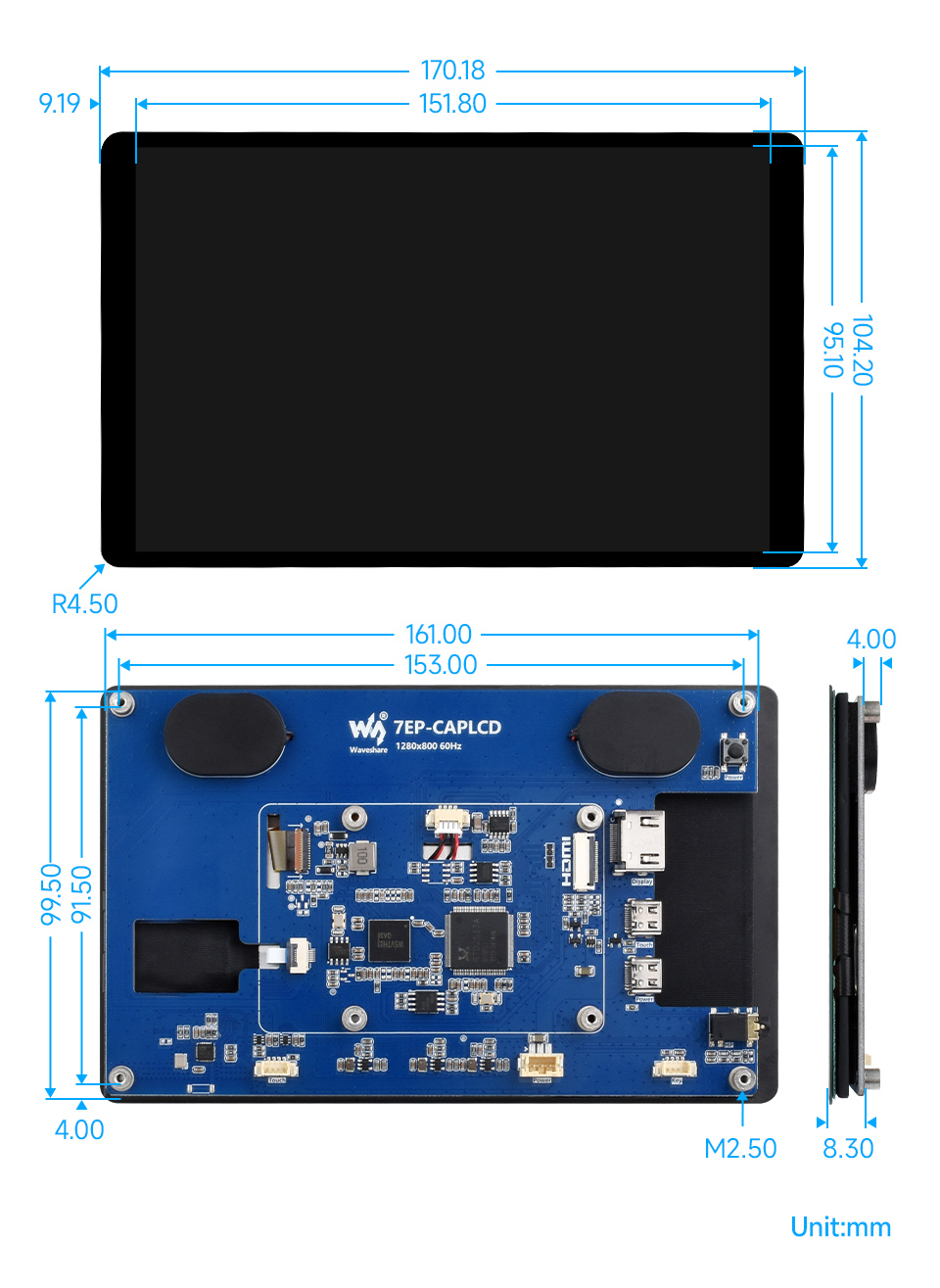
 

Dimensions

7inch Capacitive Touch Display, outline dimensions


Resources

Wiki: www.waveshare.com/wiki/7EP-CAPLCD


Package Contains

Weight: 0.37 kg

  1. 7EP-CAPLCD ×1
  2. HDMI flat cable ~1m ×1
  3. USB Type-A to Type-C cable ~1m ×1
  4. Cleaning cloth x1
  5. Micro HDMI Adapter ×1
  6. HDMI Adapter ×1
  7. Button board ×1
  8. 3PIN cable ×1
  9. HDMI to Micro HDMI Adapter ×1
  10. FFC 20PIN cable 2pcs ×1
  11. 1.27H 4PIN cable ×1
  12. PH1.25 4PIN to Type-A cable ×1
  13. Screws pack x1
7EP-CAPLCD


FAQ
Is this display compatible with Raspberry Pi, Jetson Nano and Windows PCs?
Yes. It supports Raspberry Pi OS with 10-point touch driver free, Jetson Nano with Ubuntu and single point touch driver free, and Windows PCs with 10-point touch driver free.
What connectors and power are required to install the display?
Video output uses HDMI, touch data uses a USB C port, and a 5V power supply is required. The package includes cables and adapters for HDMI, USB C, and power connections.
What are the key display specifications and capabilities?
The panel is 7 inches with 1280 by 800 resolution, IPS technology with 178 degree viewing angle, NTSC 68 percent color gamut, 350 cd per square meter brightness, and supports up to 10 point multi touch.
What is included in the package?
The package contains the 7EP CAP LCD unit, HDMI flat cable 1m, USB Type A to Type C cable 1m, cleaning cloth, Micro HDMI adapter, HDMI adapter, button board, 3PIN cable, HDMI to Micro HDMI adapter, FFC 20PIN cable 2 pieces, 1.27H 4PIN cable, PH1.25 4PIN to Type A cable, screws pack.
Is the touch experience driver dependent on the operating system?
Touch is driver free on the supported operating systems as listed, with 10 point touch on Raspberry Pi OS and Windows PCs, and single point touch on Jetson Nano and certain Ubuntu based setups.
Reviews
Forum
Welcome to the discussion thread for 7inch Wide Color Gamut Capacitive Touch Display- 1280×800 with HDMI Interface
Feel free to ask questions, share tips or report issues.
Add Post

For more discussion Click Here

Similar Products
Bulk Order

Fill out the form below and our team will get back to you with bulk pricing.

Custom Requirements?

Meet with our team