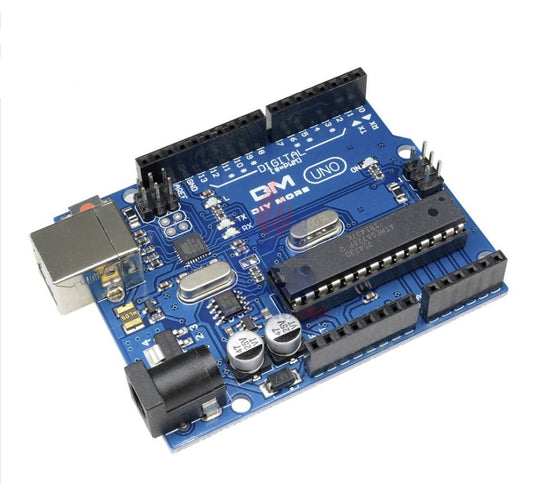
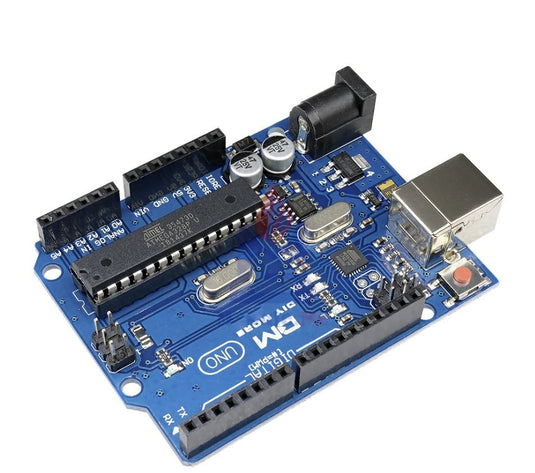
The UNO is the best board to get started with electronics and coding. If this is your first experience tinkering with the platform, the UNO is the most robust board you can start playing with. The UNO is the most used and documented board of the whole Arduino family.
Arduino Uno is a microcontroller board based on the ATmega328P (datasheet). It has 14 digital input/output pins (6 can be used as PWM outputs), 6 analog inputs, a 16 MHz quartz crystal, a USB connection, a power jack, an ICSP header, and a reset button. It contains everything needed to support the microcontroller; connect it to a computer with a USB cable or power it with an AC-to-DC adapter or battery to get started. You can tinker with your UNO without worrying too much about doing something wrong.
This is a High-Quality Variant with a CH340G chip for USB interaction.
Compatible with the Arduino line of products. Trademark registrations throughout the world for ARDUINO or Arduino® are owned by: Arduino AG and Arduino SA.
Features:
Microcontroller: Atmega328P
Operating Voltage: 5V
Input Voltage (Recommended): 7-12V
Input Voltage (Limit); 6-20V
Digital I/O Pins: 14 (of which 6 provide PWM output)
Analog Input Pins: 6
DC Current per I/O Pin: 20 mA
DC Current for 3.3V Pin: 50 mA
Flash Memory: 32 KB of which 0.5 KB used by bootloader
3D printed parts are of low finish. Lot.of sharp edges on parts. Also the fitment of the parts are not happening because of excess material. Most often the parts have to be filed or reworked. Screws are given in exact number as needed. If one screw is missed, then the assembly is impossible
The consignment was not dispatched as per committed date and had to pursue for dispatch information. The courier didn,t deliver us despit lying in Jaipur and we had to personally collect it from Courier Hub adding to inconvenience. The logistics need to be improved. Just a feedback.
Bought this from this website, stopped working within a month. Support made me wait for weeks, slow response.
At the end the Abhiram from the technical team tells me I should take it to some local electrical repair person who might be able to change the element.
Disgusting quality and service. I was told it does come under warranty but still no solution.
I've sent them photos, videos, nothing. Disgusting service.
{"id":3584713031752,"title":"R3 with Cable","handle":"arduino-uno-r3-with-cable-online","description":"\u003ch5\u003e\u003cspan\u003eDescription\u003c\/span\u003e\u003c\/h5\u003e\n\u003cp\u003e\u003cspan\u003eThe UNO is the best board to get started with electronics and coding. If this is your first experience tinkering with the platform, the UNO is the most robust board you can start playing with. The UNO is the most used and documented board of the whole Arduino family.\u003c\/span\u003e\u003c\/p\u003e\n\u003cp\u003e\u003cspan\u003e\u003cstrong\u003eArduino Uno\u003c\/strong\u003e is a microcontroller board based on the ATmega328P (datasheet). It has 14 digital input\/output pins (6 can be used as PWM outputs), 6 analog inputs, a 16 MHz quartz crystal, a USB connection, a power jack, an ICSP header, and a reset button. It contains everything needed to support the microcontroller; connect it to a computer with a USB cable or power it with an AC-to-DC adapter or battery to get started. You can tinker with your UNO without worrying too much about doing something wrong.\u003c\/span\u003e\u003c\/p\u003e\n\u003cp\u003e\u003cspan\u003eThis is a High-Quality Variant with a CH340G chip for USB interaction.\u003cbr\u003e\u003cbr\u003eCompatible with the Arduino line of products. Trademark registrations throughout the world for ARDUINO or Arduino® are owned by: Arduino AG and Arduino SA. \u003cbr\u003e\u003c\/span\u003e\u003c\/p\u003e\n\u003cp\u003e\u003cstrong\u003eFeatures:\u003c\/strong\u003e\u003c\/p\u003e\n\u003cul\u003e\n\u003cli\u003eMicrocontroller: Atmega328P\u003c\/li\u003e\n\u003cli\u003eOperating Voltage: 5V\u003c\/li\u003e\n\u003cli\u003eInput Voltage (Recommended): 7-12V\u003c\/li\u003e\n\u003cli\u003eInput Voltage (Limit); 6-20V\u003c\/li\u003e\n\u003cli\u003eDigital I\/O Pins: 14 (of which 6 provide PWM output)\u003c\/li\u003e\n\u003cli\u003eAnalog Input Pins: 6\u003c\/li\u003e\n\u003cli\u003eDC Current per I\/O Pin: 20 mA\u003c\/li\u003e\n\u003cli\u003eDC Current for 3.3V Pin: 50 mA\u003c\/li\u003e\n\u003cli\u003eFlash Memory: 32 KB of which 0.5 KB used by bootloader\u003c\/li\u003e\n\u003cli\u003eSRAM: 2 KB\u003c\/li\u003e\n\u003cli\u003eEEPROM: 1 KB\u003c\/li\u003e\n\u003cli\u003eClock Speed: 16 MHz\u003c\/li\u003e\n\u003cli\u003eLED_BULTIN: 13\u003c\/li\u003e\n\u003cli\u003eLength: 68.6 mm\u003c\/li\u003e\n\u003cli\u003eWidth: 53.4 mm\u003c\/li\u003e\n\u003c\/ul\u003e\n\u003ch5\u003eSpecifications\u003c\/h5\u003e\n\u003cp\u003e\u003cimg height=\"431\" width=\"432\" src=\"https:\/\/static.javatpoint.com\/tutorial\/arduino\/images\/arduino-uno-pinout.png\"\u003e\u003c\/p\u003e\n\u003ch5\u003eResources\u003c\/h5\u003e\n\u003cp\u003e\u003ca href=\"https:\/\/github.com\/thinkrobotics\/DATASHEET\/tree\/master\/ARDUINO\/ARD1005\"\u003eDatasheet\u003c\/a\u003e\u003c\/p\u003e\n\u003cp\u003e\u003ca href=\"https:\/\/github.com\/thinkrobotics\/SAMPLE_CODE\/tree\/master\/ARDUINO\/ARD1005\"\u003eSample Code\u003c\/a\u003e\u003c\/p\u003e\n\u003ch5\u003eTutorials\u003c\/h5\u003e\n\u003ciframe src=\"https:\/\/www.youtube.com\/embed\/PcusGFga46U?start=797\" height=\"315\" width=\"560\" allowfullscreen=\"\" allow=\"accelerometer; autoplay; encrypted-media; gyroscope; picture-in-picture\" frameborder=\"0\"\u003e\u003c\/iframe\u003e\n\u003cp\u003e \u003c\/p\u003e","published_at":"2022-12-06T11:19:32+05:30","created_at":"2019-06-04T10:34:10+05:30","vendor":"ThinkRobotics","type":"Arduino","tags":["ARD-BRD","ard1","Arduino","arduino ethernet","Arduino Uno","Atmega328","microcontroller","Uno","Uno R3","Uno Variant","ZOHO UPDATED"],"price":82999,"price_min":82999,"price_max":82999,"available":true,"price_varies":false,"compare_at_price":89999,"compare_at_price_min":89999,"compare_at_price_max":89999,"compare_at_price_varies":false,"variants":[{"id":39536361865302,"title":"Default Title","option1":"Default Title","option2":null,"option3":null,"sku":"ARD1005","requires_shipping":true,"taxable":true,"featured_image":null,"available":true,"name":"R3 with Cable","public_title":null,"options":["Default Title"],"price":82999,"weight":100,"compare_at_price":89999,"inventory_management":"shopify","barcode":"ARD1005","requires_selling_plan":false,"selling_plan_allocations":[],"quantity_rule":{"min":1,"max":null,"increment":1}}],"images":["\/\/thinkrobotics.com\/cdn\/shop\/products\/InkedAnnotation_2019-06-04_104553_LI.jpg?v=1577793973","\/\/thinkrobotics.com\/cdn\/shop\/products\/InkedAnnotation_2019-06-04_104617_LI.jpg?v=1577793973","\/\/thinkrobotics.com\/cdn\/shop\/products\/InkedAnnotation_2019-06-04_104637_LI.jpg?v=1577793973","\/\/thinkrobotics.com\/cdn\/shop\/products\/InkedAnnotation_2019-06-04_104656_LI.jpg?v=1577793974","\/\/thinkrobotics.com\/cdn\/shop\/products\/InkedAnnotation_2019-06-04_104731_LI.jpg?v=1577793974"],"featured_image":"\/\/thinkrobotics.com\/cdn\/shop\/products\/InkedAnnotation_2019-06-04_104553_LI.jpg?v=1577793973","options":["Title"],"media":[{"alt":"Arduino UNO R3 With Cable Online","id":1169827332168,"position":1,"preview_image":{"aspect_ratio":1.106,"height":868,"width":960,"src":"\/\/thinkrobotics.com\/cdn\/shop\/products\/InkedAnnotation_2019-06-04_104553_LI.jpg?v=1577793973"},"aspect_ratio":1.106,"height":868,"media_type":"image","src":"\/\/thinkrobotics.com\/cdn\/shop\/products\/InkedAnnotation_2019-06-04_104553_LI.jpg?v=1577793973","width":960},{"alt":"Arduino UNO R3 With Cable Online","id":1169827397704,"position":2,"preview_image":{"aspect_ratio":1.13,"height":844,"width":954,"src":"\/\/thinkrobotics.com\/cdn\/shop\/products\/InkedAnnotation_2019-06-04_104617_LI.jpg?v=1577793973"},"aspect_ratio":1.13,"height":844,"media_type":"image","src":"\/\/thinkrobotics.com\/cdn\/shop\/products\/InkedAnnotation_2019-06-04_104617_LI.jpg?v=1577793973","width":954},{"alt":"Arduino UNO R3 With Cable Online","id":1169827463240,"position":3,"preview_image":{"aspect_ratio":1.204,"height":794,"width":956,"src":"\/\/thinkrobotics.com\/cdn\/shop\/products\/InkedAnnotation_2019-06-04_104637_LI.jpg?v=1577793973"},"aspect_ratio":1.204,"height":794,"media_type":"image","src":"\/\/thinkrobotics.com\/cdn\/shop\/products\/InkedAnnotation_2019-06-04_104637_LI.jpg?v=1577793973","width":956},{"alt":"Arduino UNO R3 With Cable Online","id":1169827496008,"position":4,"preview_image":{"aspect_ratio":1.197,"height":802,"width":960,"src":"\/\/thinkrobotics.com\/cdn\/shop\/products\/InkedAnnotation_2019-06-04_104656_LI.jpg?v=1577793974"},"aspect_ratio":1.197,"height":802,"media_type":"image","src":"\/\/thinkrobotics.com\/cdn\/shop\/products\/InkedAnnotation_2019-06-04_104656_LI.jpg?v=1577793974","width":960},{"alt":"Arduino UNO R3 With Cable Online","id":1169827561544,"position":5,"preview_image":{"aspect_ratio":1.135,"height":844,"width":958,"src":"\/\/thinkrobotics.com\/cdn\/shop\/products\/InkedAnnotation_2019-06-04_104731_LI.jpg?v=1577793974"},"aspect_ratio":1.135,"height":844,"media_type":"image","src":"\/\/thinkrobotics.com\/cdn\/shop\/products\/InkedAnnotation_2019-06-04_104731_LI.jpg?v=1577793974","width":958}],"requires_selling_plan":false,"selling_plan_groups":[],"content":"\u003ch5\u003e\u003cspan\u003eDescription\u003c\/span\u003e\u003c\/h5\u003e\n\u003cp\u003e\u003cspan\u003eThe UNO is the best board to get started with electronics and coding. If this is your first experience tinkering with the platform, the UNO is the most robust board you can start playing with. The UNO is the most used and documented board of the whole Arduino family.\u003c\/span\u003e\u003c\/p\u003e\n\u003cp\u003e\u003cspan\u003e\u003cstrong\u003eArduino Uno\u003c\/strong\u003e is a microcontroller board based on the ATmega328P (datasheet). It has 14 digital input\/output pins (6 can be used as PWM outputs), 6 analog inputs, a 16 MHz quartz crystal, a USB connection, a power jack, an ICSP header, and a reset button. It contains everything needed to support the microcontroller; connect it to a computer with a USB cable or power it with an AC-to-DC adapter or battery to get started. You can tinker with your UNO without worrying too much about doing something wrong.\u003c\/span\u003e\u003c\/p\u003e\n\u003cp\u003e\u003cspan\u003eThis is a High-Quality Variant with a CH340G chip for USB interaction.\u003cbr\u003e\u003cbr\u003eCompatible with the Arduino line of products. Trademark registrations throughout the world for ARDUINO or Arduino® are owned by: Arduino AG and Arduino SA. \u003cbr\u003e\u003c\/span\u003e\u003c\/p\u003e\n\u003cp\u003e\u003cstrong\u003eFeatures:\u003c\/strong\u003e\u003c\/p\u003e\n\u003cul\u003e\n\u003cli\u003eMicrocontroller: Atmega328P\u003c\/li\u003e\n\u003cli\u003eOperating Voltage: 5V\u003c\/li\u003e\n\u003cli\u003eInput Voltage (Recommended): 7-12V\u003c\/li\u003e\n\u003cli\u003eInput Voltage (Limit); 6-20V\u003c\/li\u003e\n\u003cli\u003eDigital I\/O Pins: 14 (of which 6 provide PWM output)\u003c\/li\u003e\n\u003cli\u003eAnalog Input Pins: 6\u003c\/li\u003e\n\u003cli\u003eDC Current per I\/O Pin: 20 mA\u003c\/li\u003e\n\u003cli\u003eDC Current for 3.3V Pin: 50 mA\u003c\/li\u003e\n\u003cli\u003eFlash Memory: 32 KB of which 0.5 KB used by bootloader\u003c\/li\u003e\n\u003cli\u003eSRAM: 2 KB\u003c\/li\u003e\n\u003cli\u003eEEPROM: 1 KB\u003c\/li\u003e\n\u003cli\u003eClock Speed: 16 MHz\u003c\/li\u003e\n\u003cli\u003eLED_BULTIN: 13\u003c\/li\u003e\n\u003cli\u003eLength: 68.6 mm\u003c\/li\u003e\n\u003cli\u003eWidth: 53.4 mm\u003c\/li\u003e\n\u003c\/ul\u003e\n\u003ch5\u003eSpecifications\u003c\/h5\u003e\n\u003cp\u003e\u003cimg height=\"431\" width=\"432\" src=\"https:\/\/static.javatpoint.com\/tutorial\/arduino\/images\/arduino-uno-pinout.png\"\u003e\u003c\/p\u003e\n\u003ch5\u003eResources\u003c\/h5\u003e\n\u003cp\u003e\u003ca href=\"https:\/\/github.com\/thinkrobotics\/DATASHEET\/tree\/master\/ARDUINO\/ARD1005\"\u003eDatasheet\u003c\/a\u003e\u003c\/p\u003e\n\u003cp\u003e\u003ca href=\"https:\/\/github.com\/thinkrobotics\/SAMPLE_CODE\/tree\/master\/ARDUINO\/ARD1005\"\u003eSample Code\u003c\/a\u003e\u003c\/p\u003e\n\u003ch5\u003eTutorials\u003c\/h5\u003e\n\u003ciframe src=\"https:\/\/www.youtube.com\/embed\/PcusGFga46U?start=797\" height=\"315\" width=\"560\" allowfullscreen=\"\" allow=\"accelerometer; autoplay; encrypted-media; gyroscope; picture-in-picture\" frameborder=\"0\"\u003e\u003c\/iframe\u003e\n\u003cp\u003e \u003c\/p\u003e"}