


Welcome to the discussion thread for Arduino Protenta Vision Shield Ethernet
Feel free to ask questions, share tips or report issues.
Feel free to ask questions, share tips or report issues.

Professional computer vision, directional audio detection, Ethernet, and JTAG for Arduino Portenta.
The Portenta Vision Shield brings industry-rated features to your Portenta. This hardware add-on will let you run embedded computer vision applications, connect wirelessly or via Ethernet to the Arduino Cloud or your own infrastructure, and activate your system upon the detection of sound events.
The shield comes with:
The Vision Shield Ethernet has been designed to work with the Portenta H7. The Portenta boards feature multicore 32-bit ARM® Cortex® processors running at hundreds of megahertz, with megabytes of program memory and RAM. Portenta boards come with WiFi and Bluetooth®. Purchase this Shield together with the Portenta H7 for full performance.
Arduino has teamed up with OpenMV to offer you a free license to the OpenMV IDE, an easy way into computer vision using MicroPython as a programming paradigm. Download the OpenMV for Arduino Editor from our professional tutorials site and browse through the examples we have prepared for you inside the OpenMV IDE. Companies across the whole world are already building their commercial products based on this simple-yet-powerful approach to detect, filter, and classify images, QR codes, and others.

QR code detection example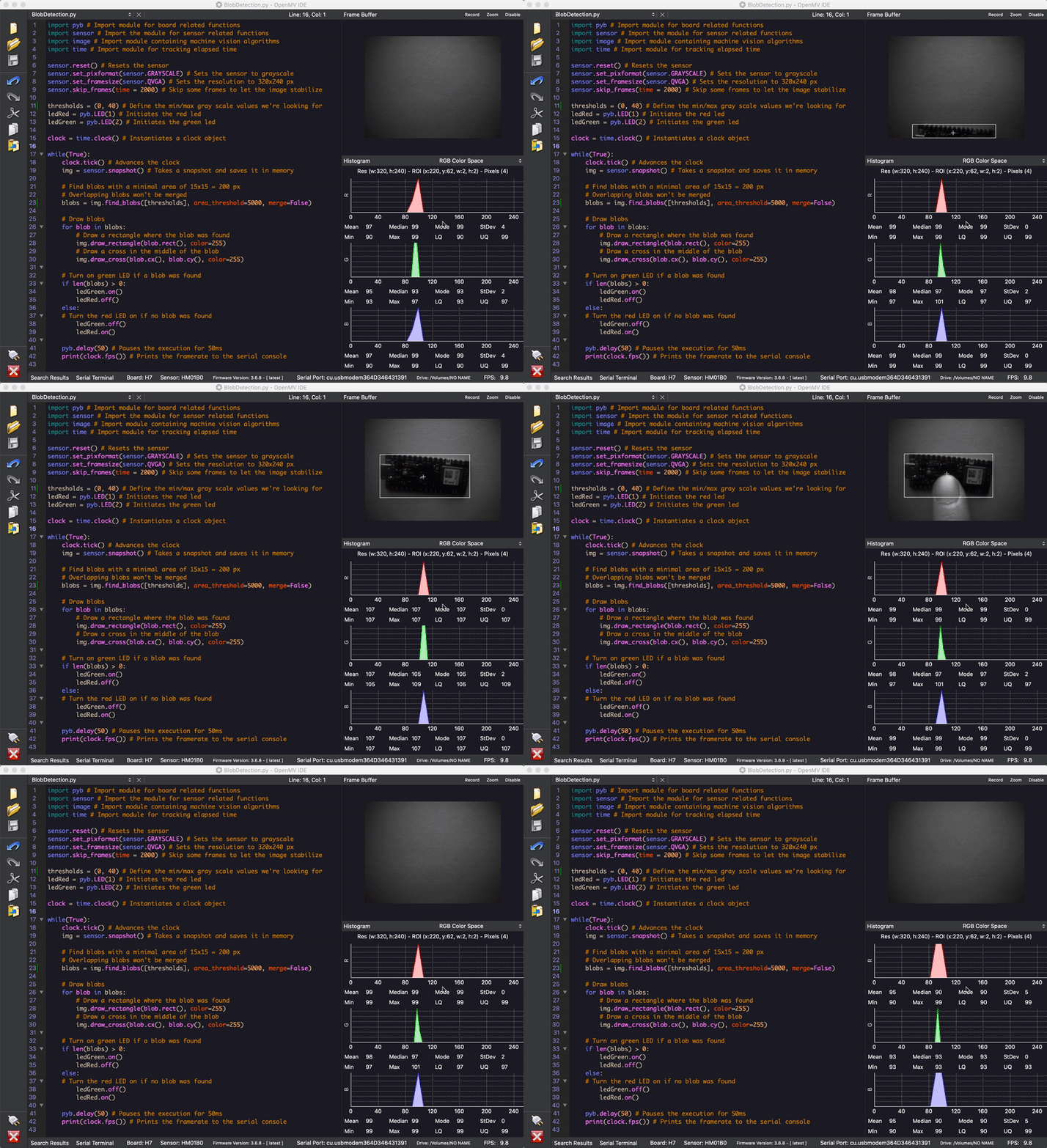
Blob analysis example
Connect your Portenta H7 to a professional debugger through the JTAG connector. Use professional software tools like the ones from Lauterbach or Segger on top of your board to debug your code step by step. The Vision Shield exposes the required pins for you to plug in your external JTAG.
The Portenta tutorials section at the Arduino Pro website contains all the information you need to configure the Portenta H7, as well as the Vision Shield, and the OpenMV editor for computer vision applications.
You can find here your board warranty information.
The Arduino Vision Shield is an active add-on to the Portenta family of boards.
| Camera | Himax HM-01B0 camera module (manufacturer site) |
| Resolution | 320 x 320 active pixel resolution with support for QVGA |
| Image sensor | High sensitivity 3.6μ BrightSense™ pixel technology |
| Microphone | 2 x MP34DT05 (datasheet) |
| Length | 66 mm |
| Width | 25 mm |
| Weight | 11 gr |
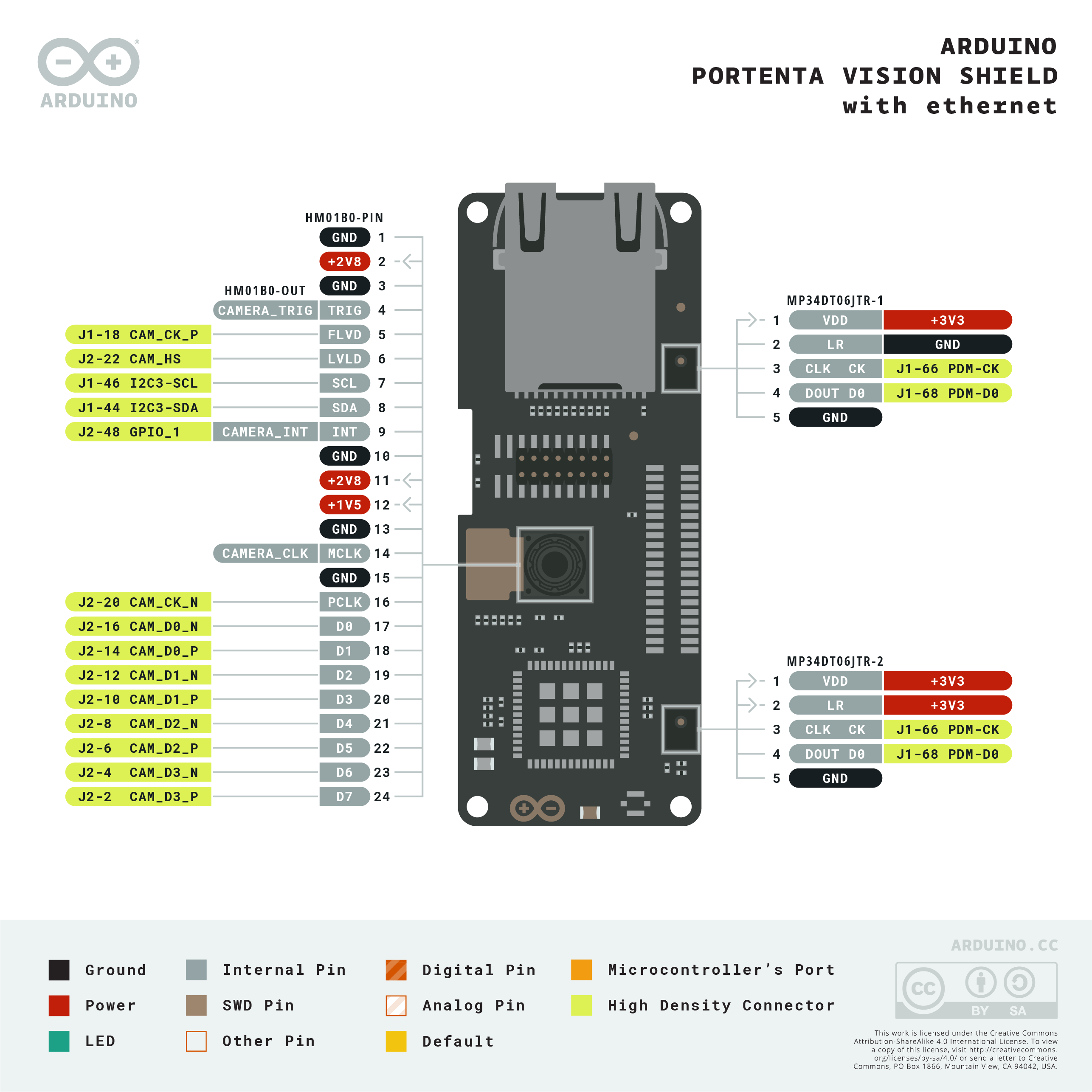
Download the full pinout diagram as PDF here.
No reviews yet. Be the first to share your experience!
For more discussion Click Here
Discover More In:
Category: View similar items (Arduino)


Fill out the form below and our team will get back to you with bulk pricing.
Professional computer vision, directional audio detection, Ethernet, and JTAG for Arduino Portenta.
The Portenta Vision Shield brings industry-rated features to your Portenta. This hardware add-on will let you run embedded computer vision applications, connect wirelessly or via Ethernet to the Arduino Cloud or your own infrastructure, and activate your system upon the detection of sound events.
The shield comes with:
The Vision Shield Ethernet has been designed to work with the Portenta H7. The Portenta boards feature multicore 32-bit ARM® Cortex® processors running at hundreds of megahertz, with megabytes of program memory and RAM. Portenta boards come with WiFi and Bluetooth®. Purchase this Shield together with the Portenta H7 for full performance.
Arduino has teamed up with OpenMV to offer you a free license to the OpenMV IDE, an easy way into computer vision using MicroPython as a programming paradigm. Download the OpenMV for Arduino Editor from our professional tutorials site and browse through the examples we have prepared for you inside the OpenMV IDE. Companies across the whole world are already building their commercial products based on this simple-yet-powerful approach to detect, filter, and classify images, QR codes, and others.
QR code detection example
Blob analysis example
Connect your Portenta H7 to a professional debugger through the JTAG connector. Use professional software tools like the ones from Lauterbach or Segger on top of your board to debug your code step by step. The Vision Shield exposes the required pins for you to plug in your external JTAG.
The Portenta tutorials section at the Arduino Pro website contains all the information you need to configure the Portenta H7, as well as the Vision Shield, and the OpenMV editor for computer vision applications.
You can find here your board warranty information.
The Arduino Vision Shield is an active add-on to the Portenta family of boards.
| Camera | Himax HM-01B0 camera module (manufacturer site) |
| Resolution | 320 x 320 active pixel resolution with support for QVGA |
| Image sensor | High sensitivity 3.6μ BrightSense™ pixel technology |
| Microphone | 2 x MP34DT05 (datasheet) |
| Length | 66 mm |
| Width | 25 mm |
| Weight | 11 gr |
Download the full pinout diagram as PDF here.
No reviews yet. Be the first to share your experience!
For more discussion Click Here
Discover More In:
Category: View similar items (Arduino)
Fill out the form below and our team will get back to you with bulk pricing.
Custom Requirements?
Related products


