Best seller

ThinkRobotics

ATMEL AT AVR ISP MKII XPII USB STK500 COMPATIBLE PROGRAMMER

SKU: ELC3034

₹ 2,499.99 ₹ 2,999.99

In stock | Ready to ship

Only a few left in stock. Order soon.
High demand right now.
📦 Min order 1
Chat with us on WhatsApp We reply quickly! Contact Us
ATMEL AT AVR ISP MKII XPII USB STK500 COMPATIBLE PROGRAMMER₹ 2,499.99
Ask AI about this product


  • Resolution
    • Using the same MCU and core circuit as AT AVRISP, easy to use, stable and reliable
    • Based on ATMEL official STK500 firmware, identified as AVRISP/STK500 in AVRStudio, high speed programming
  • Standard ISP_6PIN connector
  • CH340G USB to UART converter, supports most popular OS, including WIN10, more stable, faster programming
  • Supports AVR Studio 4/5/6/7
  • Supports 0~3.6864MHz frequency output (via the two through holes on the backside, round=GND, square=PCLK, frequency is configurable by software)

Summary  

  • Assembled and ready to use
  • 6-pin AVR-standard interfaces
  • 2 LEDs to indicate "USB/Power good" and "Busy"
  • USB powered
  • USB cable (A to B type) is included

Instructions:

  1. Use AVRDudess GUI to use this programmer to upload your HEX file. You can download it from here!
  2. Connect programmer and ICSP of Arduino with the 6-pin cable adaptor included. Then connect AVRISP to computer by USB cable (A to B type).
  3. After the hardwares are connected, we can start the Arduino IDE. Under the list of “Tools”->“Board” , choose your Arduino version. Then click “Tools” -> “Burn Bootloader” -> “w/ USBtinyISP” to start burning Arduino bootloader
  4. During burning, you will see the “BUSY” Led flashing 
  5. It will take awhile to burn (but still faster than USBasp ). You will see “Done burning bootloader” at Arduino IDE when it is done.


Supported Software

  • AVR Studio or WINAVR(GCC) is used as front-end software
  • Supports files generated by IAR, ICCAVR, CVAVR, etc.

Supported Devices

Same as AT AVR ISP:

  • Supports most AVR MCU with ISP programming option
  • Supports AT86RF401/AT89S51/AT89S52 (when programming S51/S52, the MCU.RESET is recommended to be connected with the programmer, not the external reset circuit)

Refer to AVRStudio 4.18 SP3, the following devices are supported:

Classic Tiny* Mega* Other
AT90S1200
AT90S2313
AT90S/LS2323
AT90S/LS2343
AT90S/LS2333
AT90S4414
AT90S/LS4433
AT90S/LS4434
AT90S8515
AT90S/LS8535
ATtiny12
ATtiny13
ATtiny15
ATtiny22
ATtiny2313
ATtiny24
ATtiny25
ATtiny26
ATtiny44
ATtiny45
ATtiny461
ATtiny84
ATtiny85
ATtiny861
ATmega48 ATmega48P
ATmega8 ATmega88
ATmega88P ATmega8515
ATmega8535 ATmega16
ATmega162 ATmeg164P
ATmega165 ATmega165P
ATmega168 ATmega168P
ATmega169 ATmega169P
ATmega32 ATmega324
ATmega324P ATmega325
ATmega325P ATmega3250
ATmega3250P ATmega329
ATmega329P ATmega3290
ATmega3290P ATmega64
ATmega640 ATmega644P
ATmega645 ATmega6450
ATmega649 ATmega6490
ATmega128 ATmega1280
ATmega1281 ATmega2560
ATmega2561
AT86RF401
AT89S51
AT89S52
AT90PWM2
AT90PWM2B
AT90PWM3
AT90PWM3B
AT90CAN32
AT90CAN64
AT90CAN128
AT90USB162
AT90USB646
AT90USB647
AT90USB1286
AT90USB1287
*Supports all low voltage versions of the devices with suffix of L/V, such as ATmega16L, ATmega48V

Performance

  • High speed programs FLASH ROM, EEPROM, Fuses, and Lock Bit
  • It takes only 5.5s to program a 45K program file with verification (the test MCU uses 8MHz external crystal, and programming speed is set as 1.8MHz)

Connects to PC

  • Uses a quasi-USB interface (USB To COM)
  • The COM port is configurable, a PC could connects to several USB AVRISP CH at the same time

Note: the COM port should be configured as COM1-COM4 for the first time, refer to the user manual for more details.

Connects to the Target Board

The USB AVRISP CH connects to the target board through 3 optional cables. Depending on the existed connector on the target board, the cable has to be changed accordingly.

  • For standard 6-pin ISP connector, use the default 6-pin ISP cable, the header pinout is shown in the figure below:
    3
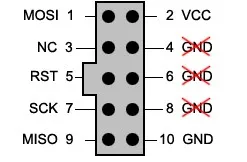
  • For standard 10-pin ISP connector, use 6-pin to 10-pin ISP cable, the header pinout is shown in the figure below:

4

  • For custom ISP connector, use the 6-wire multicolour separated cable

Note: the programmer is powered from USB connection, however, it will not power the target board, which should be powered from another supply.


Package Content:

  • 1x USBtiny ISP AVR ISP  Programmer
  • 1x USB Cable
What software do I use to program hex files with this device?
Use AVRDudess GUI to upload your HEX file with the programmer. It can also be used with the Arduino IDE for bootloader burning following the provided steps.
Which microcontrollers are supported by this programmer?
Supports most AVR MCUs with ISP programming option and includes a long list of ATmega and ATtiny devices as described in the AVRStudio compatibility section.
Does the programmer power the target board?
No, the programmer is powered from USB but will not power the target board; the target must be powered separately.
What is included in the package?
The package includes USB AVRISP CH, a USB cable, a 6 pin to 10 pin ISP cable, a 6 wire multicolour cable, a user guide CD, and a quick start sheet.
How does the connection to the target board work and what cables are available?
It connects to the target through 6 pin or 10 pin ISP connectors using the included cables; for standard 6 pin you use the 6 pin ISP cable, for 10 pin use the 6 pin to 10 pin cable, and there is also a 6 wire multi colour cable for custom connectors.
Welcome to the discussion thread for ATMEL AT AVR ISP MKII XPII USB STK500 COMPATIBLE PROGRAMMER
Feel free to ask questions, share tips or report issues.

Fill out the form below and our team will get back to you with bulk pricing.

Description
Ask AI about this product


  • Resolution
    • Using the same MCU and core circuit as AT AVRISP, easy to use, stable and reliable
    • Based on ATMEL official STK500 firmware, identified as AVRISP/STK500 in AVRStudio, high speed programming
  • Standard ISP_6PIN connector
  • CH340G USB to UART converter, supports most popular OS, including WIN10, more stable, faster programming
  • Supports AVR Studio 4/5/6/7
  • Supports 0~3.6864MHz frequency output (via the two through holes on the backside, round=GND, square=PCLK, frequency is configurable by software)

Summary  

  • Assembled and ready to use
  • 6-pin AVR-standard interfaces
  • 2 LEDs to indicate "USB/Power good" and "Busy"
  • USB powered
  • USB cable (A to B type) is included

Instructions:

  1. Use AVRDudess GUI to use this programmer to upload your HEX file. You can download it from here!
  2. Connect programmer and ICSP of Arduino with the 6-pin cable adaptor included. Then connect AVRISP to computer by USB cable (A to B type).
  3. After the hardwares are connected, we can start the Arduino IDE. Under the list of “Tools”->“Board” , choose your Arduino version. Then click “Tools” -> “Burn Bootloader” -> “w/ USBtinyISP” to start burning Arduino bootloader
  4. During burning, you will see the “BUSY” Led flashing 
  5. It will take awhile to burn (but still faster than USBasp ). You will see “Done burning bootloader” at Arduino IDE when it is done.


Supported Software

  • AVR Studio or WINAVR(GCC) is used as front-end software
  • Supports files generated by IAR, ICCAVR, CVAVR, etc.

Supported Devices

Same as AT AVR ISP:

  • Supports most AVR MCU with ISP programming option
  • Supports AT86RF401/AT89S51/AT89S52 (when programming S51/S52, the MCU.RESET is recommended to be connected with the programmer, not the external reset circuit)

Refer to AVRStudio 4.18 SP3, the following devices are supported:

Classic Tiny* Mega* Other
AT90S1200
AT90S2313
AT90S/LS2323
AT90S/LS2343
AT90S/LS2333
AT90S4414
AT90S/LS4433
AT90S/LS4434
AT90S8515
AT90S/LS8535
ATtiny12
ATtiny13
ATtiny15
ATtiny22
ATtiny2313
ATtiny24
ATtiny25
ATtiny26
ATtiny44
ATtiny45
ATtiny461
ATtiny84
ATtiny85
ATtiny861
ATmega48 ATmega48P
ATmega8 ATmega88
ATmega88P ATmega8515
ATmega8535 ATmega16
ATmega162 ATmeg164P
ATmega165 ATmega165P
ATmega168 ATmega168P
ATmega169 ATmega169P
ATmega32 ATmega324
ATmega324P ATmega325
ATmega325P ATmega3250
ATmega3250P ATmega329
ATmega329P ATmega3290
ATmega3290P ATmega64
ATmega640 ATmega644P
ATmega645 ATmega6450
ATmega649 ATmega6490
ATmega128 ATmega1280
ATmega1281 ATmega2560
ATmega2561
AT86RF401
AT89S51
AT89S52
AT90PWM2
AT90PWM2B
AT90PWM3
AT90PWM3B
AT90CAN32
AT90CAN64
AT90CAN128
AT90USB162
AT90USB646
AT90USB647
AT90USB1286
AT90USB1287
*Supports all low voltage versions of the devices with suffix of L/V, such as ATmega16L, ATmega48V

Performance

  • High speed programs FLASH ROM, EEPROM, Fuses, and Lock Bit
  • It takes only 5.5s to program a 45K program file with verification (the test MCU uses 8MHz external crystal, and programming speed is set as 1.8MHz)

Connects to PC

  • Uses a quasi-USB interface (USB To COM)
  • The COM port is configurable, a PC could connects to several USB AVRISP CH at the same time

Note: the COM port should be configured as COM1-COM4 for the first time, refer to the user manual for more details.

Connects to the Target Board

The USB AVRISP CH connects to the target board through 3 optional cables. Depending on the existed connector on the target board, the cable has to be changed accordingly.
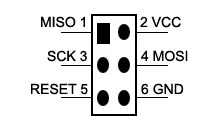
  • For standard 6-pin ISP connector, use the default 6-pin ISP cable, the header pinout is shown in the figure below:
    3
  • For standard 10-pin ISP connector, use 6-pin to 10-pin ISP cable, the header pinout is shown in the figure below:

4

  • For custom ISP connector, use the 6-wire multicolour separated cable

Note: the programmer is powered from USB connection, however, it will not power the target board, which should be powered from another supply.


Package Content:

  • 1x USBtiny ISP AVR ISP  Programmer
  • 1x USB Cable
FAQ
What software do I use to program hex files with this device?
Use AVRDudess GUI to upload your HEX file with the programmer. It can also be used with the Arduino IDE for bootloader burning following the provided steps.
Which microcontrollers are supported by this programmer?
Supports most AVR MCUs with ISP programming option and includes a long list of ATmega and ATtiny devices as described in the AVRStudio compatibility section.
Does the programmer power the target board?
No, the programmer is powered from USB but will not power the target board; the target must be powered separately.
What is included in the package?
The package includes USB AVRISP CH, a USB cable, a 6 pin to 10 pin ISP cable, a 6 wire multicolour cable, a user guide CD, and a quick start sheet.
How does the connection to the target board work and what cables are available?
It connects to the target through 6 pin or 10 pin ISP connectors using the included cables; for standard 6 pin you use the 6 pin ISP cable, for 10 pin use the 6 pin to 10 pin cable, and there is also a 6 wire multi colour cable for custom connectors.
Reviews
Forum
Welcome to the discussion thread for ATMEL AT AVR ISP MKII XPII USB STK500 COMPATIBLE PROGRAMMER
Feel free to ask questions, share tips or report issues.
Similar Products
Bulk Order

Fill out the form below and our team will get back to you with bulk pricing.

Custom Requirements?

Meet with our team