Wio Terminal is an ATSAMD51-based microcontroller with both Bluetooth and Wi-Fi Wireless connectivitypowered by Realtek RTL8720DN, compatible with Arduino and MicroPython. Currently, wireless connectivity is only supported by Arduino. More than just a single embedded functional module, Wio Terminal itself is integrated with a 2.4” LCD Screen, onboard IMU(LIS3DHTR), microphone, buzzer, microSD card slot, light sensor, infrared emitter(IR 940nm).On top of that, it also has two multifunctional Grove ports for Grove Ecosystem and 40 Raspberry pi compatible pin GPIO for more add-ons. All of these practical add-ons are carefully housed in a compact enclosure, making it an efficient and product-ready product. Equipped with Raspberry Pi 40-pin GPIO, it can be mounted to a Raspberry Pi as a slave device.
Key Features
Powerful MCU: Microchip ATSAMD51P19 with ARM Cortex-M4F core running at 120MHz
Complete system equipped with Screen + Development Board + Input/Output Interface + Enclosure
Highly Integrated Design: 2.4” LCD Screen, MCU, IMU, WIFI, BT, and more practical add-ons housed in a compact enclosure with built-in magnets & mounting holes allows you to easily set up your IoT project
Raspberry Pi 40-pin Compatible GPIO enables installation as a peripheral to the Raspberry Pi
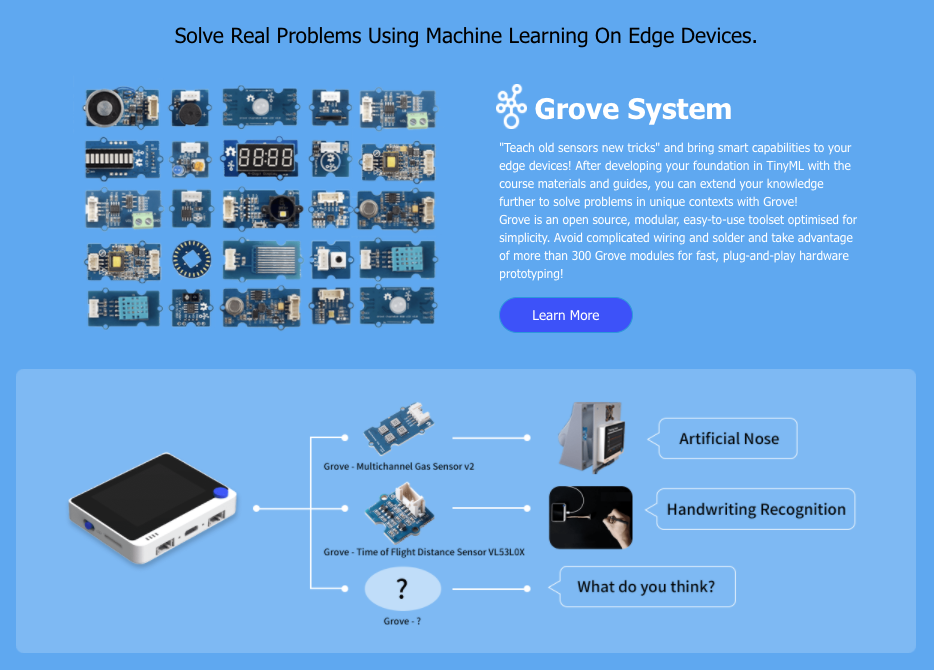
External onboard multi-functional Grove ports: Compatible with over 300 Plug&Play Grove modules to explore with IoT
USB OTG Support: can act as a USB host (reads data or signals from a mouse, keyboard, MIDI device, 3D printer, etc.) or USB client (emulates a mouse, keyboard, or MIDI device to a host PC).
Support Arduino, CircuitPython, Micropython, ArduPy(What is ArduPy?), AT Firmware, Visual Studio Code
Azure Certified Device: Sense and tag real-world data and visualize through Azure IoT Central
TELEC certificated
Description
The Wio (Wireless Input and Output) platform (Wio Link, Wio Nodes, etc.) was first introduced to the world at the end of 2015 by Seeed.
Meet our new member: Wio Terminal is compatible with Arduino and Micropython, built with an ATSAMD51 microcontroller with wireless connectivity supported by Realtek RTL8720DN. Its CPU speed runs at 120MHz (Boost up to 200MHz). Realtek RTL8720DN chip supports both Bluetooth and Wi-Fi providing the backbone for IoT projects. The Wio Terminal is Highly Integrated with a 2.4” LCD Screen, there is an onboard IMU(LIS3DHTR), microphone, buzzer, microSD card slot, light sensor, and infrared emitter(IR 940nm).
There are built-in magnets and two mounting holes on the well-designed enclosure, allowing you to set up your IoT project without hassle.
On top of that, it also has two multifunctional Grove ports for connecting with over 300 modules and Raspberry Pi 40-pin compatible GPIO for tons of Pi HAT add-ons, which means there are endless IoT possibilities you can create with this tiny device!
With Wio Terminal, you can:
Sense and tag the Real-World data with over 300 Groves created by Seeed and visualize through Azure IoT Central Platform to create an end-to-end IoT project
Use 100% open-source Hardware in a pythonic way
Build your program interpreter starting from 90% with an LCD screen and compact enclosure
Create embedded GUI with easy-to-use graphical elements and beautiful visualized editing tools.
Check the Wio Terminal Starter Kit, which is a collaboration between Seeed and Microsoft for IoT beginners. The hardware includes Wio Terminal provided by Seeed, a variety of optional Grove, other mods, etc. Learn the basics of the Internet of Things with this free 12-week, 24-lesson curriculum from Microsoft Cloud Advocates. Build prototypes of real-world IoT projects as you learn all about IoT whilst following the journey of food from farm to table.
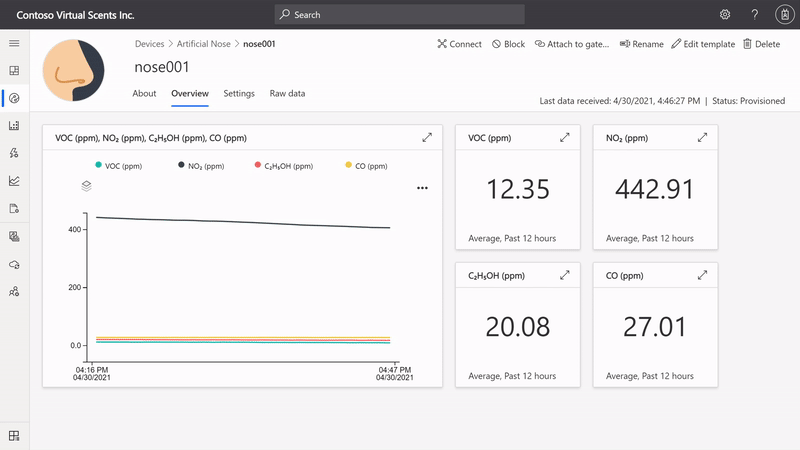
Wio Terminal is an Azure-certified device, not only can the artificial nose sense and tag the scents you want to know in the air, but everything can be analyzed and visualized in real-time through Azure IoT Central. More importantly, you can automatically trigger rules when, for example, a bad smell is being detected, therefore allowing the nose to be much smarter than if it were just a standalone, offline, device.
Connecting the Artificial Nose to Azure IoT Central – Real-time telemetry.
What other cool things can you play with Wio Terminal?
Artificial Nose that can Discern Different Kinds of Rum or ScotchTV
Affordable IR Thermal Imaging Camera
Remote Controller
Cost-effective Pulse Oximeter
Weather Forecast Monitor
Run TinyGO on Wio Terminal
Printer
GPS Navigator
Water Level Detector
Applications
Python Terminal Device
Data Collection Machine Learning powered device
Hand-held analyzer
Retro Gaming Device
IoT Controller
Smart Robot for Education
IoT application quick prototyping
Slave devise / Accessories for Raspberry Pi
Collaborate With the Worldwide Community!
Wio Terminal Classroom
In this show, our engineer Lakshantha will explain how to use the Wio terminal along with the software and present you with fun demos as well! In this episode, you will learn about how to draw text strings by using the coordinate system and will learn to display "Hello World!" at the end of the video!
Stay tuned to our show and we hope this helps you to gain more knowledge on how to program with the Wio Terminal!
Fully Open-source Manufacturing Process
As a fully open-source device, Wio Terminal development will continue to optimize its performance and every update will be publicized on our blog. We are also making a series of Vlog about the fully open-source manufacturing process of Seeed products. From hardware and software development to each step of manufacture and testing, you can find all you want to know about Wio Terminal, check now!
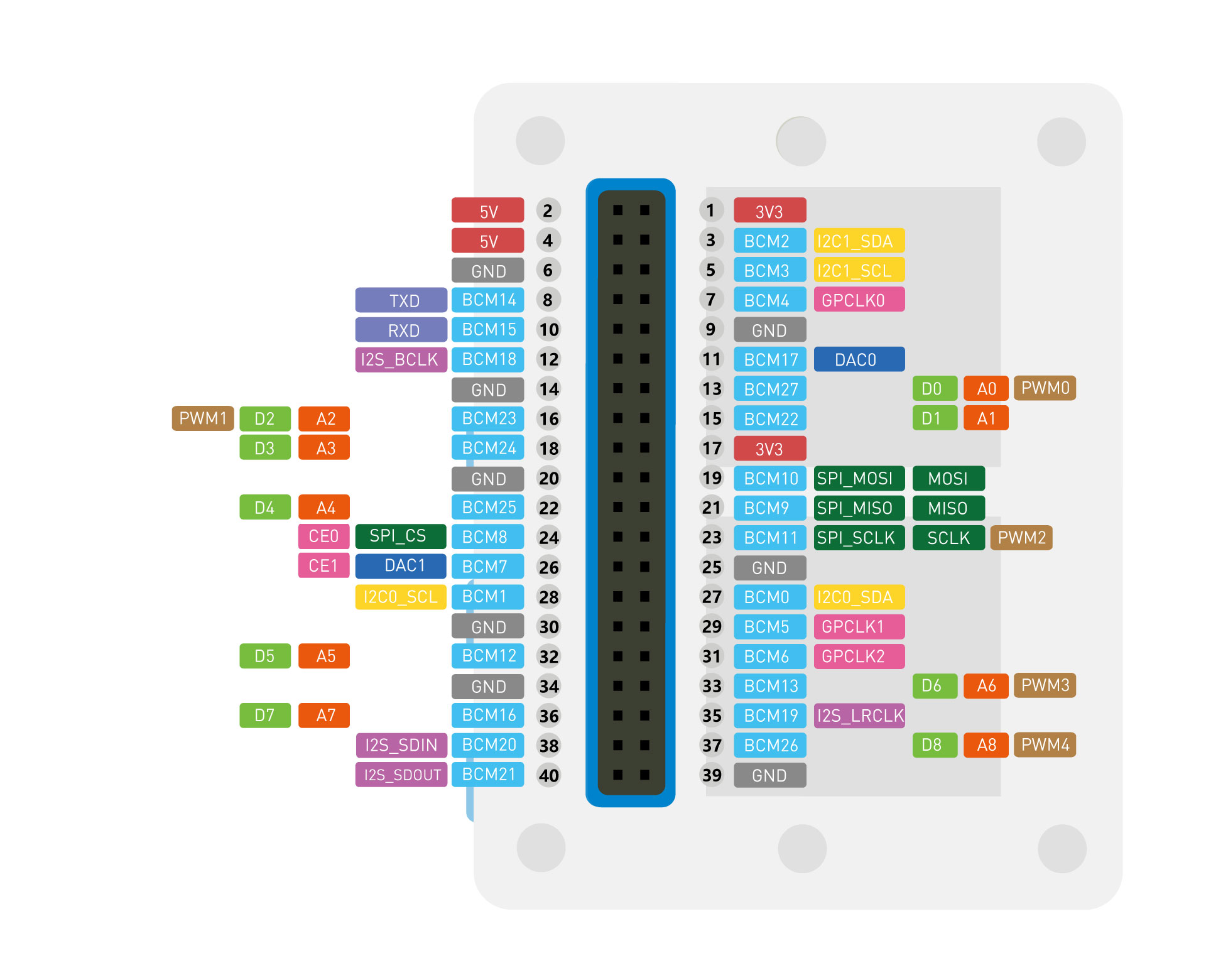
Pinout Diagram
Wio Terminal Pin Out Overview by Seeed
Wio Terminal Pin Out Overview by @matsujirushi12
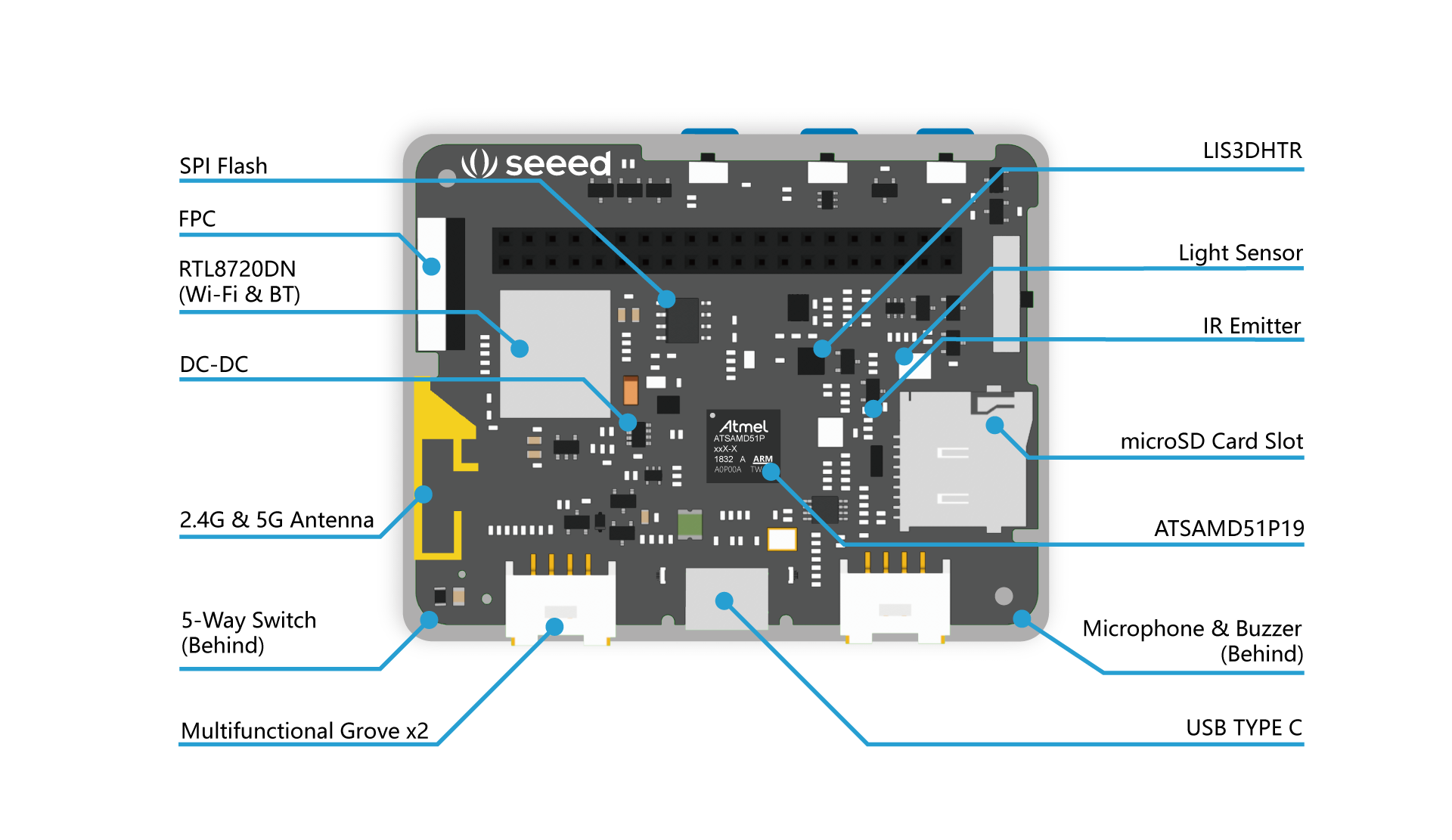
Hardware Overview
Setup, Documentation, and Support
An invitation to join the Seeed Community on Discord! Click here to join our Wio Terminal Channel for a 24/7/365 making, sharing, and helping each other out. https://discord.gg/WSXszPA2wC
Please visit our wiki for more information about Wio Terminal. If you have any questions, feel free to ask us at our Forum.
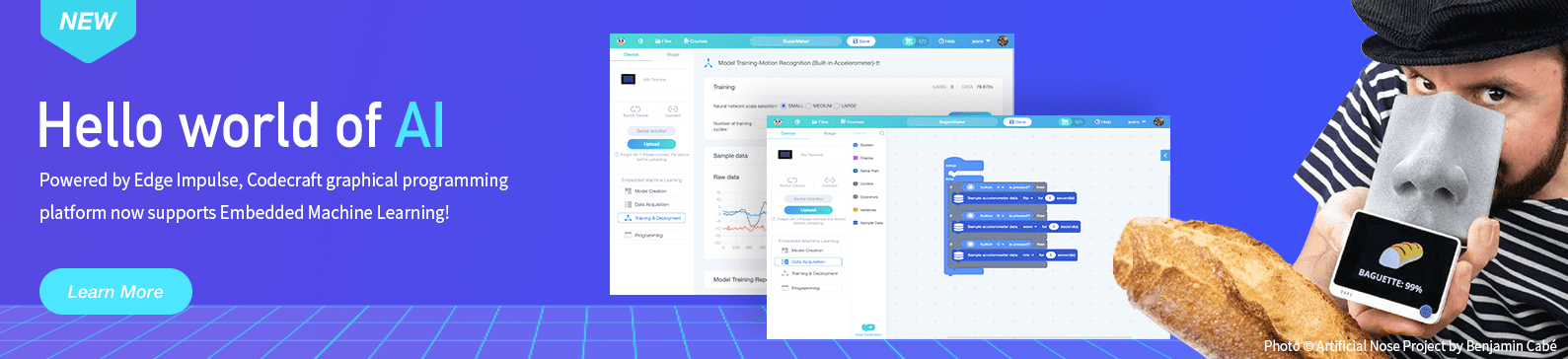
Edge Impulse enables developers to create the next generation of intelligent device solutions with embedded Machine Learning. Machine Learning at the very edge will enable valuable use of the 99% of sensor data that is discarded today due to cost, bandwidth or power constraints.
What programming environments are supported and is wireless connectivity available for all of them?
The board supports Arduino and MicroPython, but wireless connectivity is currently supported only when using Arduino.
What built in hardware features does the board include?
It includes a 2.4 inch LCD screen, an onboard LIS3DHTR IMU, a microphone, a buzzer, a microSD card slot, a light sensor, and an infrared emitter.
Can I use the Raspberry Pi GPIO and Grove ports with this board?
Yes, the board has Raspberry Pi 40 pin GPIO for mounting as a peripheral to a Raspberry Pi and two multifunction Grove ports that support over 300 Grove modules.
What wireless capabilities are supported?
It provides Bluetooth Low Energy 5.0 and dual band Wi Fi via RTL8720DN, supporting 2.4 GHz and 5 GHz networks.
Is the device Azure IoT Central compatible?
Yes, it is an Azure certified device and can sense and visualize data through Azure IoT Central.
No reviews yet. Be the first to share your experience!
Wio Terminal is an ATSAMD51-based microcontroller with both Bluetooth and Wi-Fi Wireless connectivitypowered by Realtek RTL8720DN, compatible with Arduino and MicroPython. Currently, wireless connectivity is only supported by Arduino. More than just a single embedded functional module, Wio Terminal itself is integrated with a 2.4” LCD Screen, onboard IMU(LIS3DHTR), microphone, buzzer, microSD card slot, light sensor, infrared emitter(IR 940nm).On top of that, it also has two multifunctional Grove ports for Grove Ecosystem and 40 Raspberry pi compatible pin GPIO for more add-ons. All of these practical add-ons are carefully housed in a compact enclosure, making it an efficient and product-ready product. Equipped with Raspberry Pi 40-pin GPIO, it can be mounted to a Raspberry Pi as a slave device.
Key Features
Powerful MCU: Microchip ATSAMD51P19 with ARM Cortex-M4F core running at 120MHz
Complete system equipped with Screen + Development Board + Input/Output Interface + Enclosure
Highly Integrated Design: 2.4” LCD Screen, MCU, IMU, WIFI, BT, and more practical add-ons housed in a compact enclosure with built-in magnets & mounting holes allows you to easily set up your IoT project
Raspberry Pi 40-pin Compatible GPIO enables installation as a peripheral to the Raspberry Pi
External onboard multi-functional Grove ports: Compatible with over 300 Plug&Play Grove modules to explore with IoT
USB OTG Support: can act as a USB host (reads data or signals from a mouse, keyboard, MIDI device, 3D printer, etc.) or USB client (emulates a mouse, keyboard, or MIDI device to a host PC).
Support Arduino, CircuitPython, Micropython, ArduPy(What is ArduPy?), AT Firmware, Visual Studio Code
Azure Certified Device: Sense and tag real-world data and visualize through Azure IoT Central
TELEC certificated
Description
The Wio (Wireless Input and Output) platform (Wio Link, Wio Nodes, etc.) was first introduced to the world at the end of 2015 by Seeed.
Meet our new member: Wio Terminal is compatible with Arduino and Micropython, built with an ATSAMD51 microcontroller with wireless connectivity supported by Realtek RTL8720DN. Its CPU speed runs at 120MHz (Boost up to 200MHz). Realtek RTL8720DN chip supports both Bluetooth and Wi-Fi providing the backbone for IoT projects. The Wio Terminal is Highly Integrated with a 2.4” LCD Screen, there is an onboard IMU(LIS3DHTR), microphone, buzzer, microSD card slot, light sensor, and infrared emitter(IR 940nm).
There are built-in magnets and two mounting holes on the well-designed enclosure, allowing you to set up your IoT project without hassle.
On top of that, it also has two multifunctional Grove ports for connecting with over 300 modules and Raspberry Pi 40-pin compatible GPIO for tons of Pi HAT add-ons, which means there are endless IoT possibilities you can create with this tiny device!
With Wio Terminal, you can:
Sense and tag the Real-World data with over 300 Groves created by Seeed and visualize through Azure IoT Central Platform to create an end-to-end IoT project
Use 100% open-source Hardware in a pythonic way
Build your program interpreter starting from 90% with an LCD screen and compact enclosure
Create embedded GUI with easy-to-use graphical elements and beautiful visualized editing tools.
Check the Wio Terminal Starter Kit, which is a collaboration between Seeed and Microsoft for IoT beginners. The hardware includes Wio Terminal provided by Seeed, a variety of optional Grove, other mods, etc. Learn the basics of the Internet of Things with this free 12-week, 24-lesson curriculum from Microsoft Cloud Advocates. Build prototypes of real-world IoT projects as you learn all about IoT whilst following the journey of food from farm to table.
Wio Terminal is an Azure-certified device, not only can the artificial nose sense and tag the scents you want to know in the air, but everything can be analyzed and visualized in real-time through Azure IoT Central. More importantly, you can automatically trigger rules when, for example, a bad smell is being detected, therefore allowing the nose to be much smarter than if it were just a standalone, offline, device.
Connecting the Artificial Nose to Azure IoT Central – Real-time telemetry.
What other cool things can you play with Wio Terminal?
Artificial Nose that can Discern Different Kinds of Rum or ScotchTV
Affordable IR Thermal Imaging Camera
Remote Controller
Cost-effective Pulse Oximeter
Weather Forecast Monitor
Run TinyGO on Wio Terminal
Printer
GPS Navigator
Water Level Detector
Applications
Python Terminal Device
Data Collection Machine Learning powered device
Hand-held analyzer
Retro Gaming Device
IoT Controller
Smart Robot for Education
IoT application quick prototyping
Slave devise / Accessories for Raspberry Pi
Collaborate With the Worldwide Community!
Wio Terminal Classroom
In this show, our engineer Lakshantha will explain how to use the Wio terminal along with the software and present you with fun demos as well! In this episode, you will learn about how to draw text strings by using the coordinate system and will learn to display "Hello World!" at the end of the video!
Stay tuned to our show and we hope this helps you to gain more knowledge on how to program with the Wio Terminal!
Fully Open-source Manufacturing Process
As a fully open-source device, Wio Terminal development will continue to optimize its performance and every update will be publicized on our blog. We are also making a series of Vlog about the fully open-source manufacturing process of Seeed products. From hardware and software development to each step of manufacture and testing, you can find all you want to know about Wio Terminal, check now!
Pinout Diagram
Wio Terminal Pin Out Overview by Seeed
Wio Terminal Pin Out Overview by @matsujirushi12
Hardware Overview
Setup, Documentation, and Support
An invitation to join the Seeed Community on Discord! Click here to join our Wio Terminal Channel for a 24/7/365 making, sharing, and helping each other out. https://discord.gg/WSXszPA2wC
Please visit our wiki for more information about Wio Terminal. If you have any questions, feel free to ask us at our Forum.
Edge Impulse enables developers to create the next generation of intelligent device solutions with embedded Machine Learning. Machine Learning at the very edge will enable valuable use of the 99% of sensor data that is discarded today due to cost, bandwidth or power constraints.
FAQ
What programming environments are supported and is wireless connectivity available for all of them?
The board supports Arduino and MicroPython, but wireless connectivity is currently supported only when using Arduino.
What built in hardware features does the board include?
It includes a 2.4 inch LCD screen, an onboard LIS3DHTR IMU, a microphone, a buzzer, a microSD card slot, a light sensor, and an infrared emitter.
Can I use the Raspberry Pi GPIO and Grove ports with this board?
Yes, the board has Raspberry Pi 40 pin GPIO for mounting as a peripheral to a Raspberry Pi and two multifunction Grove ports that support over 300 Grove modules.
What wireless capabilities are supported?
It provides Bluetooth Low Energy 5.0 and dual band Wi Fi via RTL8720DN, supporting 2.4 GHz and 5 GHz networks.
Is the device Azure IoT Central compatible?
Yes, it is an Azure certified device and can sense and visualize data through Azure IoT Central.
Reviews
No reviews yet. Be the first to share your experience!